
Best WhatsApp chatbots for a small business: prices, Meta's fees and keeping the app
Yevhen Kurapov, co-founder · Updated Oct 20, 2026
To answer WhatsApp questions from your own information, ChatPal is free for 100 replies a month, then $20 for 500. WATI ($69 plus $99 for its AI), respond.io and SleekFlow suit teams; ManyChat and SendPulse build flows. On every tool, Meta charges replies past 1,000 a month per number: $0.0034 each to US customers.
We make ChatPal, one of the tools below, and list its limits on the same terms as everyone else's.
The best WhatsApp chatbot for a small business is the one that answers what your customers actually ask, on a plan you can afford once Meta's own message fees are added. If most of your WhatsApp is questions about prices, hours, stock or bookings, an AI chatbot that answers from your own information does the job without flows to build: ChatPal does that from a free plan. If a team sells over WhatsApp and sends broadcasts, look at WATI, respond.io or SleekFlow and budget for their AI separately. ManyChat and SendPulse build button flows, with AI added inside them.
We make ChatPal. We checked every price on this page on each vendor's own site on 20 October 2026, and Meta's rates on Meta's own pricing pages the same day.
Three things decide the pick
- Who writes the answers. A WhatsApp AI chatbot answers from your price list, FAQ or website, so a new question needs a line in your documents, not a new flow. A flow builder replies with what you scripted and falls back to AI only where you add an AI step.
- Whether you keep the WhatsApp Business app. If the business number is the phone your team answers from today, you want a tool that leaves it there. All six support this now, in different ways (table below).
- What you pay on top. The tool's subscription, its AI add-on if the AI is sold separately, and Meta's per-message fees, which every tool passes on.
What Meta charges on top of every WhatsApp chatbot
Meta charges for messages a business sends on the WhatsApp Business Platform, the official connection all six tools use. It bills your business directly, so the fee is the same whichever chatbot you pick. What we read on Meta's pages on 20 October 2026:
- Replies are free up to 1,000 a month per number. Since October 1, 2026, Meta charges for service messages, its name for any reply sent within 24 hours of the customer's last message, from the 1,001st each month. Unused free replies don't roll over.
- The rate depends on the customer's country, not yours. A reply to a US number costs $0.0034; to a Spanish number, €0.0166.
- Messages you start cost more. A marketing template, such as an offer sent to past customers, is $0.0250 to a US number and €0.0585 to a Spanish one, with no free allowance.
- Customers from click-to-WhatsApp ads are free for a while. Meta opens a free window when someone writes from one of those ads, and messages in it aren't charged.
- Replies from the WhatsApp Business app stay free. If you keep the app on the number, what you send from your phone costs nothing; what the chatbot sends counts toward the 1,000.
- Add a payment method in Meta's Billing Hub. Without one, Meta delivers replies up to the free 1,000 and drops the rest. ChatPal still shows those replies in Chats, but the customer never gets them, and ChatPal emails you a warning.
In practice: a chatbot that sends 1,500 replies a month to US customers pays Meta for 500 of them, $1.70. The same month to Spanish customers is €8.30. The full breakdown, with more countries, is in our guide to WhatsApp Business API pricing.
Meta also sells its own AI agent, Meta Business Agent, at $2.00 per million tokens, about 4 to 5 cents a message by Meta's estimate. A third-party chatbot's replies are billed differently: as ordinary service messages at the rates above, plus the tool's own price.
Keeping the WhatsApp Business app
Meta lets a number stay in the WhatsApp Business app while a chatbot answers through the API. It calls this coexistence. Every tool here supports it; they differ in how you switch it on and whether your old chats come along.
| Tool | Keep the app? | How it's switched on | Past chats |
|---|---|---|---|
| ChatPal | Yes | Connect and keep the app, while connecting | Last six months of one-to-one chats, read-only |
| WATI | Yes | Ask WATI's team | Up to six months |
| respond.io | Yes | Add the channel in respond.io; Meta decides eligibility | Not synced |
| SleekFlow | Yes, in selected countries | Channels page, while connecting | One-to-one chats from the last six months |
| ManyChat | Yes | While connecting your existing number | Not transferred |
| SendPulse | Yes, if Meta finds you eligible | While connecting | Not checked |
Meta's trade-offs apply to every tool: linked devices are unlinked when you connect and can be linked again, except WhatsApp for Windows and WearOS, which aren't supported; broadcast lists in the app become read-only; and the number disconnects if the phone with the app stays inactive for about 14 days. What changes in ChatPal, step by step, is in keeping the WhatsApp Business app and adding an AI assistant.
How we chose
We picked tools a small business would realistically compare for WhatsApp: three team inboxes, two flow builders and one AI answering tool, ours. For each we read the pricing page and the help center on 20 October 2026, and noted where the AI works, what it costs on top of the plan, and how the tool handles a number that stays in the WhatsApp Business app. We did not test the others hands-on. Prices are in the US dollars each site shows; some show your local currency instead, so confirm yours. The tools are grouped by the situation they suit, not ranked.
Six WhatsApp chatbots, by situation
| Tool | Best for | Price |
|---|---|---|
| ChatPal | AI answers from your own information | Free for 100 replies a month; $20 for 500, $50 for 1,500 and $120 for 4,000, billed monthly; Meta's fees on top |
| WATI | Team inboxes with AI as an add-on | Growth $69 a month billed monthly or $59 billed yearly; AI on WhatsApp is Astra Pro, $99 a month extra; Meta's fees on top |
| respond.io | Team inboxes with AI as an add-on | Starter $79 a month billed yearly; AI Agents from Growth, $159 a month billed yearly ($1,908 a year); Meta's fees on top |
| SleekFlow | Team inboxes with AI as an add-on | Pro with AI agents US$109 a month billed yearly (US$1,308 a year), plus US$15 a month per WhatsApp number and Meta's fees |
| ManyChat | Flow builders | WhatsApp from Pro: $39 a month billed monthly or $29 billed yearly ($348 a year), for 2,500 active contacts; Meta's fees on top |
| SendPulse | Flow builders | Chatbots Pro from $12 a month, or $9.60 a month billed yearly, by subscriber count; Meta's fees on top |
AI answers from your own information
ChatPal
Price: Free for 100 replies a month; $20 for 500, $50 for 1,500 and $120 for 4,000, billed monthly; Meta's fees on top
Good at
- Answers from your files, web pages and Shopify catalog, with no flows to build
- Keep the WhatsApp Business app: reply from your phone and the assistant steps back from that chat
- Books in the chat through Google Calendar, Calendly or Altegio, with free times as a tappable list
- WhatsApp, Instagram, Messenger, Telegram and website chat on every plan, the free one included
Keep in mind
- No broadcasts or campaigns: it only answers customers who write first
- Voice messages and videos get no reply
Team inboxes with AI as an add-on
WATI
Price: Growth $69 a month billed monthly or $59 billed yearly; AI on WhatsApp is Astra Pro, $99 a month extra; Meta's fees on top
Good at
- Astra Pro answers on web and WhatsApp, with 5,000 credits a month
- Coexistence keeps the WhatsApp Business app on your number and syncs up to six months of chat history
Keep in mind
- Coexistence isn't in the setup: you ask WATI's team to switch it on
- Running Astra inside WATI's team inbox needs WATI Pro ($149 a month, $119 billed yearly) or Business
- Growth includes 3 users and can't add more
respond.io
Price: Starter $79 a month billed yearly; AI Agents from Growth, $159 a month billed yearly ($1,908 a year); Meta's fees on top
Good at
- AI Agents answer from documents and web pages you add
- Coexistence connects a number that stays in the WhatsApp Business app
- 7-day trial with no card
Keep in mind
- No AI Agents on Starter
- With Coexistence, past chats stay in the app: contact and message history isn't synced
SleekFlow
Price: Pro with AI agents US$109 a month billed yearly (US$1,308 a year), plus US$15 a month per WhatsApp number and Meta's fees
Good at
- Coexistence is set up from the Channels page and imports one-to-one chats from the last six months
- Pro includes 10 users
Keep in mind
- No free plan, only a 7-day Pro trial; Essential (US$49 a month billed yearly) has no AI agents
- Coexistence is available only in selected countries
Flow builders
ManyChat
Price: WhatsApp from Pro: $39 a month billed monthly or $29 billed yearly ($348 a year), for 2,500 active contacts; Meta's fees on top
Good at
- AI Steps inside your flows work on WhatsApp, Instagram, Messenger, TikTok and Telegram
- Connects a number you already use in the WhatsApp Business app, through Coexistence
Keep in mind
- AI Replies from your saved knowledge work only on Instagram, and Manychat AI is in beta
- No WhatsApp on the Free or Essential plans
- Your chat history doesn't transfer to ManyChat
SendPulse
Price: Chatbots Pro from $12 a month, or $9.60 a month billed yearly, by subscriber count; Meta's fees on top
Good at
- One Pro plan covers WhatsApp, Instagram, Messenger, Telegram, Viber, live chat and TikTok
- Active WhatsApp Business app users can connect the same number, if Meta finds them eligible
Keep in mind
- AI runs on your own OpenAI, Claude, Gemini or DeepSeek key, paid separately, on a paid plan
- WhatsApp needs a paid plan after a 7-day trial that asks for a card
What one month costs, Meta included
Take one WhatsApp number, about 400 customer conversations a month, and three AI replies per conversation: 1,200 replies. The three is our assumption, not a measured average, so count a week of your own chats. Each price is the plan a tool needs for its AI to answer WhatsApp in its own inbox.
| Tool | Plan with AI on WhatsApp | Tool cost a month | Meta, US customers | Meta, Spanish customers |
|---|---|---|---|---|
| ChatPal | Standard, 1,500 replies | $50, billed monthly | $0.68 | €3.32 |
| WATI | Pro plus Astra Pro | $248 billed monthly, $218 with Pro billed yearly | $0.68 | €3.32 |
| respond.io | Growth | $159, billed yearly | $0.68 | €3.32 |
| SleekFlow | Pro plus one number | US$124, Pro billed yearly | $0.68 | €3.32 |
| ManyChat | Pro, 2,500 contacts | $39 billed monthly, $29 billed yearly | $0.68 | €3.32 |
| SendPulse | Pro | From $12, plus your AI provider's bill | $0.68 | €3.32 |
Meta's column is 200 replies past the free 1,000. It is identical for every tool and small next to the subscription for US customers. It grows if your team also replies from the tool's inbox, because those replies count too, and it is higher for countries with higher rates.
The table leaves out three things. ManyChat's AI on WhatsApp runs as AI Steps inside flows you build; its AI Replies from saved knowledge are Instagram only. SendPulse's AI bill depends on your own OpenAI or other provider's usage, which we can't estimate. And for WATI we assume you want Astra inside WATI's inbox, which needs Pro; Astra Pro alone is $99.
A smaller business, 100 conversations a month. That is about 300 replies, inside Meta's free 1,000, so Meta charges nothing. ChatPal's $20 plan covers 500 replies; its free plan covers 100. The team inboxes cost the same with fewer conversations.
When ChatPal isn't the right pick
- You send broadcasts. Offers, order updates and abandoned-cart reminders are template messages. ChatPal doesn't send them; WATI, respond.io, SleekFlow, ManyChat and SendPulse do.
- Your customers send voice notes. ChatPal reads text and photos on WhatsApp and gives no reply to voice messages, videos or documents. If voice notes are common, say on your WhatsApp profile that a person answers them.
- A sales team works leads in a pipeline. The team inboxes are built for assigning chats, tracking deals and reporting per agent.
ChatPal fits when the work is answering: prices, hours, delivery, stock from a connected Shopify or Horoshop store, bookings into Google Calendar, Calendly or Altegio, and handing a chat to you when a customer asks for a person. Its setup and limits on WhatsApp are on the WhatsApp chatbot page.
Before you connect a number
- Add a payment method in Meta's Billing Hub if you expect more than 1,000 replies a month on the number.
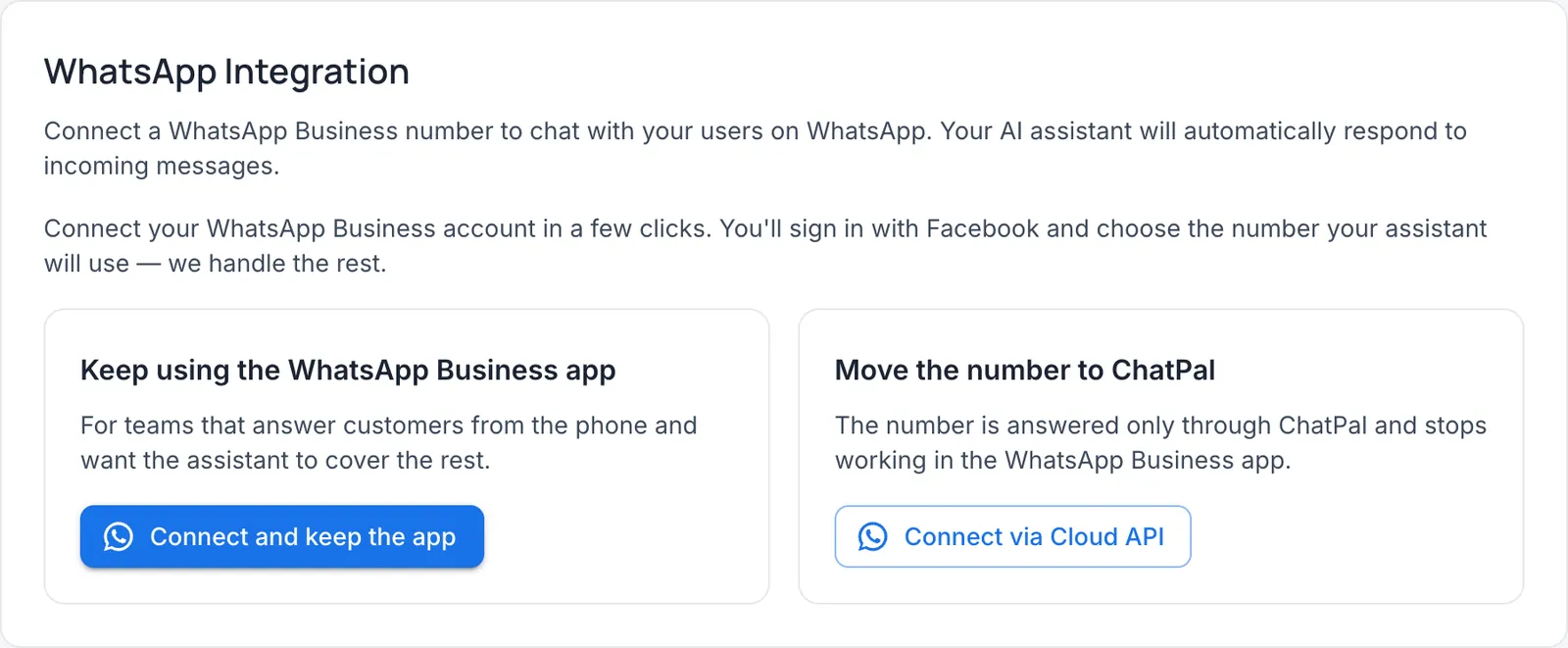
- Decide whether the app stays. In ChatPal, go to Integrations → WhatsApp and choose Connect and keep the app to keep answering from your phone, or Connect via Cloud API to move the number to ChatPal. Keeping the app: tick I understand, click Continue, sign in with Facebook, pick the number and scan the QR code from the WhatsApp Business app (Settings → Account → Business Platform).
- Test with ten real questions from last month, sent from another phone. Reply to one yourself from the app: the chat is marked Operator on the phone and the assistant stays out of it until you click Return to AI or 24 hours pass, a period you can change.
- Read the first week of chats before you rely on it. How to write answers it can use is in our guide to WhatsApp auto-replies with AI.
If your customers also write on Instagram and Telegram, the tools for all three are compared in AI chatbots for WhatsApp, Instagram and Telegram, and WATI on its own in WATI alternatives.