
AI chatbots for WhatsApp, Instagram and Telegram: which one fits a small business
Yevhen Kurapov, co-founder · Updated Oct 5, 2026
If most messages are questions about prices, hours and orders, pick a tool that answers from your own information: ChatPal does that on WhatsApp, Instagram and Telegram from its free plan. The others suit other jobs: ManyChat for Instagram campaigns and broadcasts, WATI, respond.io and SleekFlow for teams sharing one WhatsApp inbox, Tidio when website chat comes first.
We make ChatPal, one of the tools below, and list its limits on the same terms as everyone else's.
Are you open on Sunday? Do you do gluten-free? Can I collect at eight? How much is a birthday cake for twenty? If questions like these fill your WhatsApp and Instagram, an AI chatbot can answer them, on the channels and plans the table below shows.
The short answer for a bakery
If you work alone or with one helper, start with ChatPal's free plan: it costs nothing, and 100 replies are enough to try it on real questions. WATI, respond.io and SleekFlow are inboxes for teams sharing one WhatsApp number, so skip them unless several people will answer customers. ManyChat is the pick if you mainly want Instagram campaigns and broadcasts. Telegram is one column of the table; if your customers don't use it, ignore it.
Before you start, know what ChatPal can't do for a bakery:
- It doesn't place or process orders on WhatsApp or Instagram; it can collect contact details as a lead. It answers questions about a cake, and you take the order yourself by replying from the ChatPal inbox once the chat is handed to you (step 5 below). If most of your messages are orders, not questions, it covers only half the job.
- On WhatsApp it reads up to four photos per message (10 MB each) but not voice messages or videos, which get no answer. A photo of a cake someone wants copied is read and answered from, but a custom design still needs you. Say in your Instagram bio or WhatsApp business profile that voice notes and videos go to you.
- On Instagram it reads text and up to four photos per message; voice messages and videos are ignored. A reply to your story is answered like any message, but the assistant can't see which story it was about, and story mentions get no answer.
- On every channel it can't start a conversation with a customer (the customer writes first), and it doesn't take voice calls. On Telegram it answers private chats only, reads up to four photos per message (10 MB each), and gives no answer to audio or video.
What to check before you pick
- How it answers. A flow builder replies only with what you scripted, so "is the sourdough vegan?" falls through unless the tool's AI covers that channel. An AI tool answers from your price list or FAQ, so a new question needs a line in that document, but read its answers in the first weeks to catch mistakes.
- Whether you want to message customers first. An offer to everyone who ordered at Christmas is a broadcast. ChatPal can't do it; ManyChat's Pro plan includes broadcasts.
- What reaches you, and how. A custom cake order, an allergy question where a wrong answer hurts, a complaint: these should reach you with the chat history attached. Ask each vendor whether you can name those topics yourself. In ChatPal you can (step 5 below).
- Which channels come on your plan. Look at where last month's messages came from, then check the plan: ManyChat connects two channels on its free plan and three on Pro, and Tidio offers Telegram only on its top two plans.
How we chose
We make ChatPal, so weigh our verdicts accordingly. We did not test the other tools hands-on: we read each one's pricing page and help center on 28 and 29 September 2026 (all prices below are from those days; the WATI and SleekFlow Pro figures and the Tidio channel list were read on 29 September) and noted which channels come on which plan, what is metered and what costs extra. The tools are grouped by the situation they suit, not ranked.
Six tools, by situation
| Tool | Best for | Price |
|---|---|---|
| ChatPal | AI answers from your own information | Free for 100 replies a month; $20 for 500, $50 for 1,500 and $120 for 4,000, per month |
| ManyChat | Flow builders with AI added | Pro $29 a month billed yearly ($348 a year), for 2,500 active contacts |
| Tidio | Website chat with AI added | Free plan; Starter $24.17 a month billed yearly on the US page (€24.17 on the European page), including 50 Lyro AI conversations, a one-off allowance |
| WATI | WhatsApp-first team inboxes | Growth plan: $69 a month or $708 a year on the US page; €69 a month on the Spain page |
| respond.io | WhatsApp-first team inboxes | Starter $79 a month billed yearly ($948 a year); AI Agents from Growth, $159 a month billed yearly ($1,908 a year) |
| SleekFlow | WhatsApp-first team inboxes | Pro plan with AI agents included: US$109 a month billed yearly (US$1,308 a year), or US$139 a month billed monthly |
AI answers from your own information
ChatPal
Price: Free for 100 replies a month; $20 for 500, $50 for 1,500 and $120 for 4,000, per month
Good at
- Answers from your own files and web pages, with no flows to build
- WhatsApp, Instagram, Messenger, Telegram and website chat on every plan, the free one included
- Keep the WhatsApp Business app: reply from your phone and the assistant steps back on that chat
- Hands a chat to you, and your reply from the ChatPal inbox reaches the customer on their own channel
Keep in mind
- No Viber
- Doesn't reply to voice messages or videos
Flow builders with AI added
ManyChat
Price: Pro $29 a month billed yearly ($348 a year), for 2,500 active contacts
Good at
- Pro includes broadcasts as well as automations and AI-powered conversations
- The free plan connects any two channels; Pro connects any three, and Business is unlimited
Keep in mind
- WhatsApp needs Pro or above; the free and Essential plans do not include it
- Billing counts each person you interact with in a month as an active contact, and contacts above the plan cost extra
- The free and Essential plans connect only two channels at once, so WhatsApp plus Instagram leaves no room for a third
Website chat with AI added
Tidio
Price: Free plan; Starter $24.17 a month billed yearly on the US page (€24.17 on the European page), including 50 Lyro AI conversations, a one-off allowance
Good at
- Starter includes 50 Lyro AI conversations, a one-off allowance that does not renew each month
Keep in mind
- Telegram only on the top two plans, Plus and Premium
- AI is metered in Lyro conversations, and Starter's 50 are a one-off allowance, not a monthly one
WhatsApp-first team inboxes
WATI
Price: Growth plan: $69 a month or $708 a year on the US page; €69 a month on the Spain page
Good at
- Built around WhatsApp; its channel article also lists Instagram, Facebook, TikTok and website chat
Keep in mind
- The $69 Growth plan connects one channel
- Astra Pro, $99 a month, is the tier that adds WhatsApp to WATI's AI agents; the free Astra tier is web widget only
- To use a number you already have, you must first delete the WhatsApp account on it, and WATI's FAQ says WhatsApp chat backups can't be imported
respond.io
Price: Starter $79 a month billed yearly ($948 a year); AI Agents from Growth, $159 a month billed yearly ($1,908 a year)
Good at
- WhatsApp, Instagram, Messenger, Telegram, Viber, website chat, SMS and email, among others
- From Growth, AI Agents answer from documents or web pages you add
Keep in mind
- No free plan, only a 7-day trial
- Meta's WhatsApp fees are billed on top of the plan
SleekFlow
Price: Pro plan with AI agents included: US$109 a month billed yearly (US$1,308 a year), or US$139 a month billed monthly
Good at
- WhatsApp, Instagram, Messenger, Telegram, Viber and website live chat
- Pro includes 10 user accounts and a flow builder
Keep in mind
- No free plan, only a 7-day trial
- Each WhatsApp number adds US$15 a month, plus message rates
Channels side by side
| Tool | Telegram | Messenger | Viber | Website chat | ||
|---|---|---|---|---|---|---|
| ChatPal | Every plan | Every plan | Every plan | Every plan | No | Every plan |
| ManyChat | Yes | Yes | Yes | Yes | Not listed | Not listed |
| Tidio | Listed | Listed | Plus and Premium only | Listed | Not listed | Yes |
| WATI | Yes | Listed | Not listed | Listed as Facebook | Not listed | Listed |
| respond.io | Yes | Yes | Yes | Yes | Yes | Yes |
| SleekFlow | Yes | Yes | Yes | Yes | Yes | Yes |
"Yes" and "Listed" mean the vendor lists the channel, not that every plan includes it. Check the plan you would buy. ManyChat's free and Essential plans connect any two channels at once, and Pro any three, but WhatsApp on ManyChat needs Pro or above. WATI's $69 Growth plan connects one channel, so its other listed channels are not all on that plan.
The table is about channels only. Where the AI answers is a separate question. WATI's AI agents list web, WhatsApp and voice, not Instagram. ChatPal's pricing page lists WhatsApp Business, Instagram DMs, Facebook Messenger, Telegram and the web widget as included in every plan, and its product documentation lists AI responses and knowledge-base answers on all of them.
What it costs a small business
Take a bakery with about 150 conversations a month across WhatsApp and Instagram, roughly five a day. Opening hours take one reply; a cake enquiry can take six. We assume an average of four replies, a rough guess rather than a measured figure, which makes about 600 replies a month. For ManyChat we assume every conversation is a different customer. Swap in your own numbers.
- ChatPal: 600 replies need the $50 plan (1,500); the $20 plan's 500 falls just short. Replies to your own test messages count too, so start on the free plan for setup and upgrade when you go live. The free plan's 100 replies cover about 25 such conversations. What happens at the limit is in the FAQ.
- ManyChat: 150 people are 150 active contacts. The free plan's 25 active contacts are too few. WhatsApp needs Pro or above ($29 a month billed yearly, 2,500 active contacts), so a bakery on WhatsApp starts at Pro. Essential ($14 a month billed yearly, 250 contacts) suits an Instagram-only shop.
- Tidio: Starter is $24.17 a month billed yearly and includes 50 Lyro AI conversations, a third of the bakery's 150, so check what extra conversations cost before you commit.
- WATI: Astra Pro, the tier that adds WhatsApp to its AI agents, is $99 a month. WATI's Growth plan, which connects one channel, is $69 a month or $708 a year on the US page, and €69 a month on the Spain page.
- respond.io: Growth, the first plan with AI Agents, is $159 a month billed yearly ($1,908 a year), plus Meta's WhatsApp fees.
- SleekFlow: the Pro plan includes AI agents, and each WhatsApp number adds US$15 a month plus message rates. Pro is US$109 a month billed yearly (US$1,308 a year), or US$139 a month billed monthly.
Prices are quoted as each vendor publishes them. ChatPal, respond.io and SleekFlow publish in dollars. Tidio showed different currencies by location (we read $24.17 for Starter from a US page and €24.17 from a European one), and ManyChat says its price depends on your billing country, so check your own price. We didn't check whether VAT is added, so a UK or EU business should check each pricing page for its own total.
On WhatsApp, Meta also charges for messages. ChatPal charges no per-message fee of its own, and its documentation doesn't say who owes Meta's charges, so if your volume is high, ask ChatPal before you connect. The rate is on Meta's WhatsApp Business Platform pricing page.
Setting one up
- Write down what people ask. Scroll back through last month's messages and list the questions you answer more than twice: hours, order cut-off, allergens, delivery area, lead time for a celebration cake, prices.
- Put the answers where the tool can read them. Upload your price list, allergen sheet and FAQ page. If they only live in a phone note or an Instagram highlight, type them into a text file first. Create a ChatPal account (the free plan is enough for this), open Configuration, go to the Files tab and click Upload files (PDF, Word .docx or plain text), or add pages on the Links tab.
- Connect WhatsApp, if it is your busiest channel. You need a number that is live in the WhatsApp Business app on your phone, not a personal WhatsApp account, and a Facebook account to sign in with in Meta's popup. In ChatPal, go to Integrations → WhatsApp and choose Connect and keep the app, tick I understand and click Continue, then scan the QR code the popup shows from the WhatsApp Business app (Settings → Account → Business Platform). The number stays in the app on your phone, and a reply from the phone pauses the assistant in that chat, for 24 hours by default. If you agree to share your chat history when connecting, ChatPal also brings your last six months of one-to-one chats into its inbox, for reading only. The trade-offs: no official business badge, no WhatsApp for Windows or WearOS, and Meta disconnects the number after about 14 days without the app being used on the phone. If it does disconnect, the integration page shows a Connect and keep the app button to reconnect. If your number is on a personal WhatsApp account, ChatPal's documentation doesn't cover switching it to the Business app, so follow WhatsApp's own instructions first.
- Connect Instagram, if that is where your customers write. The account must be a Business or Creator account, not a personal one, and it must be linked to a Facebook Page. You can switch the account type in the Instagram app. Then go to Integrations → Instagram, click Connect Instagram, log in to the account and grant the permissions Instagram asks for. They let ChatPal read your Direct Messages and reply on your behalf. Connect one channel, test it, then add the other.
- Decide what goes to a person. For a bakery that is usually custom orders, allergy questions with no clear answer in your sheet, and complaints. In ChatPal, open Configuration, go to the Settings tab, find Additional Settings and turn on Enable human-in-the-loop: the assistant then passes a chat to you when a customer asks to speak to a person. To hand over orders even when nobody asks, under Categories click Add, enter a Category name such as "Custom cake order" and a Description, choose Human escalation as the behaviour, and click Create. Either way the assistant goes quiet in that chat, you get an alert by email or Telegram, and you reply from the ChatPal inbox with the whole conversation in front of you.
- Test with ten real messages from last month. Send them from a personal WhatsApp account to your business number, or from a second Instagram account; if you have neither, ask a friend to send them. Your test replies count toward the free plan's 100, so pick a handful of the ten to start with. Then read Chats in ChatPal each evening for the first week before you add the next channel.
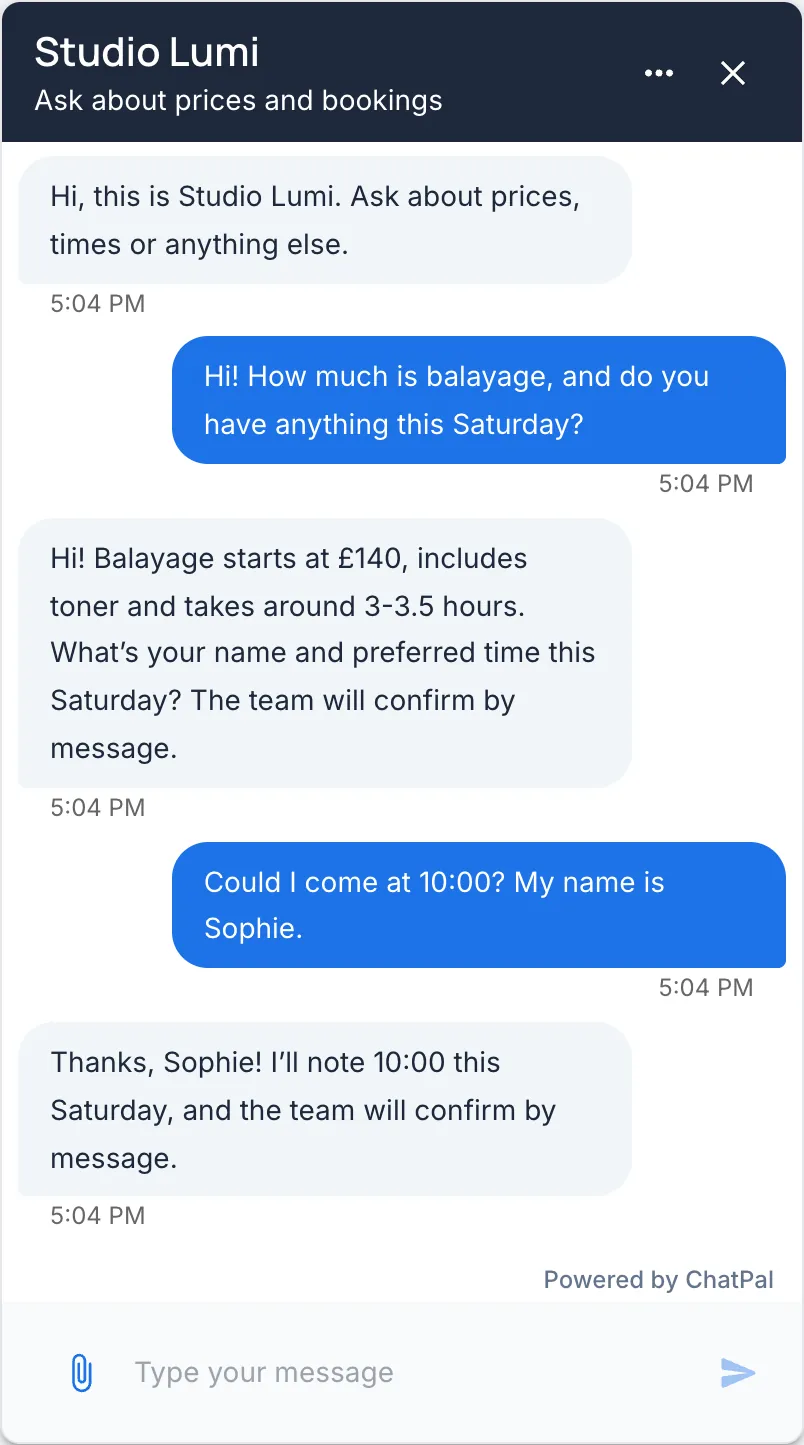
We have no bakery demo and don't publish customers' chats, so we can't show a conversation on WhatsApp or Instagram. The closest is ChatPal's website chat answering from a demo salon's price list.
For a bakery like the one above, try ChatPal's free plan on the one channel your customers use most, and read its answers for a week before deciding. ChatPal's setup for each channel is on WhatsApp and Instagram. If you already use ManyChat, see ManyChat alternatives.
The full steps are in the guides to booking appointments, keeping the WhatsApp Business app and an AI chatbot on Telegram.