
Chatbase alternatives: what to use instead, and when to stay
Yevhen Kurapov, co-founder · Updated Oct 5, 2026
If you keep running out of Chatbase message credits, Chatling and DocsBot work the same way with more credits for the money. ChatPal counts each reply as one message and also answers on WhatsApp, Instagram, Messenger and Telegram. For product docs, look at CustomGPT.ai; for a growing support team, Fin. Stay if you rely on Chatbase's integrations.
We make ChatPal, one of the tools below, and list its limits on the same terms as everyone else's.
Every tool on this page does what Chatbase does: it learns from your website and documents and answers visitors from them. They differ in what they meter, what visitors see when you hit the limit, and where else the assistant can answer.
Why people look past Chatbase
Credits, not messages. Chatbase meters message credits. Each request to the AI model costs credits: 1 on most models, 2 to 6 on stronger ones such as GPT-5.5 or Claude Opus. With actions turned on, one visitor message can mean several requests. So Hobby's 700 credits can be 700 replies, or 175 on GPT-5.5, which costs 4 credits a message.
What visitors see at zero. When the credits run out, the chat tells visitors the agent is currently unavailable and asks the owner to check the account. Credits renew at the start of each calendar month and unused ones don't carry over; auto-recharge adds 1,000 for $40.
Big price steps. Hobby is $40 a month for 700 credits, Standard $150 for 4,000, Pro $500 for 15,000. Each extra agent is $25 a month, and removing the "Powered by Chatbase" line is $99 a month. One Capterra reviewer found the price steep for the credits each plan includes.
Freshness. Chatbase re-reads your websites, Notion pages and tickets every week on Standard and Pro. On Hobby you retrain by hand when your pages change.
When Chatbase is still the right choice
Stay if you use its actions and integrations, such as Stripe, HubSpot, Salesforce, Calendly or Zendesk, or if you want voice answers, which start on Standard. Chatbase also answers on Slack, which ChatPal doesn't. If your volume sits comfortably inside your credits and your widget has never gone quiet at the end of a month, switching costs more than it saves.
How we chose
We looked for tools that learn from your own website and documents the way Chatbase does, can be set up without a developer, and publish prices. For each we read the pricing page and documentation on September 27, 2026, and noted what is metered, what happens at the limit and which channels are included. We make ChatPal; we did not test the others hands-on. We left out builder platforms such as Botpress, where you design the bot's flows yourself.
The tools are grouped by the situation they suit, not ranked.
Chatbase and six alternatives, by situation
| Tool | Best for | Price |
|---|---|---|
| Chatbase | Staying on Chatbase | Free for 50 message credits a month; Hobby $40 a month for 700 credits, Standard $150 for 4,000, billed monthly |
| ChatPal | Your website plus messaging apps | Free for 100 replies a month; $20 for 500 and $50 for 1,500, billed monthly |
| Chatling | Your website plus messaging apps | Free for 200 AI credits a month; Starter $25 a month or $21 billed yearly, for 1,750 credits |
| SiteGPT | A website chatbot, like for like | Starter $59 a month, or $39 a month billed yearly; 7-day trial with a card |
| DocsBot | Answers from product docs | Free for 100 AI credits a month; Personal $49 a month for 5,000 |
| CustomGPT.ai | Answers from product docs | Standard $99 a month, or $89 billed yearly, for 1,000 queries |
| Fin | A growing support team | $0.99 per resolved conversation, plus seats from $29 a month billed yearly |
Staying on Chatbase
Chatbase
Price: Free for 50 message credits a month; Hobby $40 a month for 700 credits, Standard $150 for 4,000, billed monthly
Good at
- Trains on files, websites, text, Q&A, Notion pages and support tickets
- Website chat, email, voice, WhatsApp, Slack, Messenger and Instagram
- Integrations with Stripe, Zendesk, Salesforce, HubSpot, Calendly and more
Keep in mind
- At zero credits the chat tells visitors the agent is unavailable
- Stronger models cost 2 to 6 credits a message instead of 1
- Unused credits don't carry over, and each extra agent is $25 a month
Your website plus messaging apps
ChatPal
Price: Free for 100 replies a month; $20 for 500 and $50 for 1,500, billed monthly
Good at
- Website chat, WhatsApp, Instagram, Messenger, Telegram and Zendesk on every plan, the free one included
- Learns from your files and website links, and the playground shows what each answer used so you can fix it
- Simple to budget: one reply is one message on your plan, and the free plan needs no card
Keep in mind
- One assistant on the free plan, and your own test replies count too
- No Slack, email or voice
Chatling
Price: Free for 200 AI credits a month; Starter $25 a month or $21 billed yearly, for 1,750 credits
Good at
- WhatsApp, Instagram, Messenger and Telegram from Starter
- Light models cost 0.5 or 1 credit a reply
Keep in mind
- Credit-metered like Chatbase: premium models cost up to 25 credits a reply
- The free plan is website only, and Chatling's branding stays until Scale ($295) or a $35 monthly add-on
A website chatbot, like for like
SiteGPT
Price: Starter $59 a month, or $39 a month billed yearly; 7-day trial with a card
Good at
- Up to 4,000 GPT-4.1-mini messages a month on Starter
- Trains on website links, sitemaps, YouTube videos and text files
Keep in mind
- GPT-4.1 messages cost ten times as much: 400 a month on Starter
- No free plan; Starter has no integrations and only manual refresh
Answers from product docs
DocsBot
Price: Free for 100 AI credits a month; Personal $49 a month for 5,000
Good at
- Messenger, WhatsApp and Telegram from Personal
- Re-reads your sources monthly on Personal and weekly from Standard
Keep in mind
- At the credit cap the bot stops answering and shows visitors an error message
- Large models use up to 50 credits a message
CustomGPT.ai
Price: Standard $99 a month, or $89 billed yearly, for 1,000 queries
Good at
- Trains on websites, uploaded files, YouTube, Google Drive, Notion, Zendesk and more
- Ten agents on Standard, sharing one monthly allowance
Keep in mind
- When the monthly queries run out, agents stop taking new questions until the next cycle
- Each question an agent answers is a query; 2,500 extra cost $375 a month
A growing support team
Fin
Price: $0.99 per resolved conversation, plus seats from $29 a month billed yearly
Good at
- Answers from help articles, PDFs, web pages, and Zendesk, Confluence or Notion content
- Live chat, email and in-app chat included; WhatsApp and SMS pay as you go
Keep in mind
- A conversation counts as resolved when the visitor doesn't ask for more help, not only when they confirm it
- Web pages are re-read only once a week
What the same month costs
Take a website with about 300 conversations a month and three visitor messages in each: roughly 900 AI replies on a standard model.
- Chatbase: 900 credits is more than Hobby's 700, so Hobby ($40) plus a $40 pack of 1,000 credits, $80 in all, or Standard at $150. On a 2-credit model such as GPT-5.2 it is 1,800 credits: Hobby plus two packs, $120.
- ChatPal: 900 replies fit the $50 plan (1,500 replies).
- Chatling: 900 credits at 1 credit a reply fit Starter's 1,750: $25 a month, or $21 billed yearly.
- SiteGPT: 900 GPT-4.1-mini messages fit Starter: $59 a month, or $39 billed yearly.
- DocsBot: 900 credits at 1x fit Personal's 5,000: $49 a month.
- CustomGPT.ai: 900 queries fit Standard's 1,000: $99 a month, or $89 billed yearly.
- Fin: at $0.99 per resolved conversation, up to $297 if all 300 count, plus at least one seat from $29 a month billed yearly.
ChatPal isn't the cheapest here. Chatling covers the same messaging apps from $25 but meters credits that change with the model; ChatPal counts every reply as one message. Prices were checked on September 27, 2026.
Choose Chatbase if…, choose ChatPal if…
Choose Chatbase if:
- you rely on its actions with Stripe, HubSpot, Salesforce or Calendly;
- you want phone or voice answers;
- your team works in Slack.
Choose ChatPal if:
- your customers also write on WhatsApp, Instagram or Telegram, and you want the same assistant there, on the free plan too;
- you want a bill counted in replies, not in credits that change with the model;
- you want your team to take over a chat and reply from one inbox, whichever channel it came from.
Moving off Chatbase
- Keep your sources. Save the files you trained on and a list of the website links. You add them again in the new tool; any Q&A pairs you wrote go into its FAQ or Q&A section.
- Know what stays behind. Chat history, actions and integrations you set up in Chatbase don't move. Rebuild only the ones you use.
- Check what the new tool meters and what visitors see at its limit. Work out your month in its unit, whether that is credits that change with the model, replies, queries or resolved conversations, before you switch.
- Run both for a week. Put the new tool on one page or one channel, ask both the same questions from last month, and compare the answers before you move the widget.
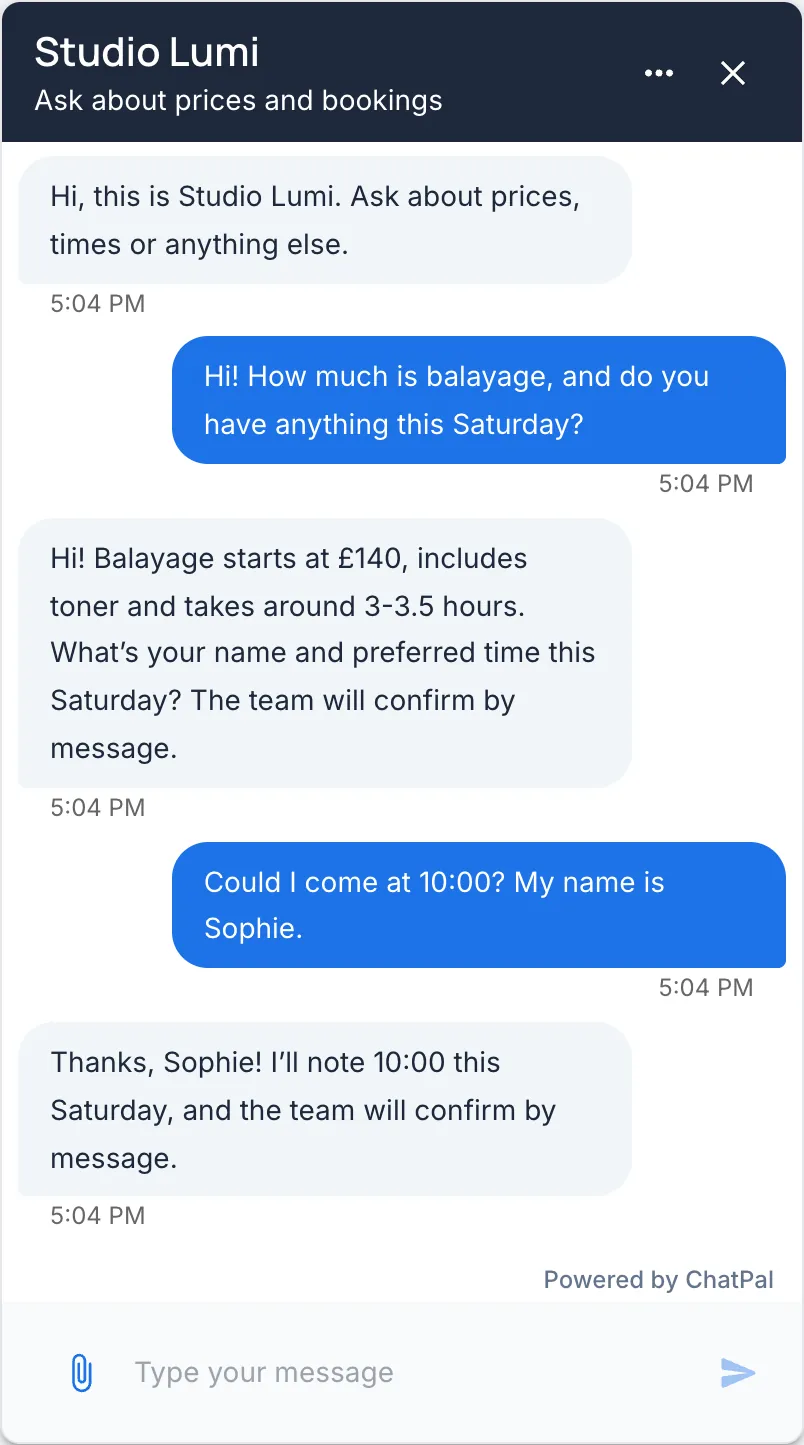
Here is ChatPal answering from a demo business's own price list, which is the Chatbase idea: an assistant that answers from your content rather than from a script.
For ChatPal on your site, see ChatPal for your website and the plans. If your customers mostly write on Instagram, the ManyChat alternatives comparison covers tools for that channel.
If you are also weighing Tidio, see Tidio alternatives.