
Tidio alternatives: what to use when Lyro runs out, and when to stay
Yevhen Kurapov, co-founder · Updated Oct 5, 2026
Lyro is sold in blocks of AI conversations, from 50 a month for $39. ChatPal counts each AI reply, on flat plans from $20 a month, and also answers on WhatsApp, Instagram, Messenger and Telegram. Shopify Inbox is free in your store's chat. Crisp's AI runs on credits. Stay on Tidio for email tickets or flows.
We make ChatPal, one of the tools below, and list its limits on the same terms as everyone else's.
Tidio sells its AI, Lyro, in blocks of conversations. For a small Shopify store that means a quota that can run out mid-month, and a bill that climbs one step at a time.
Why people look past Tidio
Lyro is priced per AI conversation, in steps. Lyro is its own package: Tidio sells it alone or with a live chat plan, so these prices are for the AI only and your live chat plan is billed separately. On monthly billing, 50 AI conversations a month cost $39, 100 cost $75, 200 cost $140, 500 cost $350 and 1,000 cost $700. Billed yearly, the first step is $32.50 a month. Above 1,000, Tidio asks you to contact it. A store that grows from 50 to 200 AI conversations goes from $39 to $140 a month for the AI alone.
What counts as one conversation depends on which Tidio page you read. A Lyro conversation is any conversation with at least one reply from Lyro. The pricing FAQ says a customer who leaves the chat and comes back later is still one conversation. The help center says a thread closes after 15 minutes of inactivity, and the next message from that customer counts again. Say a customer asks about sizes, goes to measure and writes again half an hour later: by the pricing FAQ that is one conversation, by the help center it is two. On the plus side, a conversation Lyro hands straight to a person isn't deducted.
At the limit, Lyro pauses or the plan grows. When the monthly quota runs out, Lyro stops answering until it resets on the day of the month you bought it. On new Tidio projects on a standard monthly plan (not Plus), automatic upgrade is switched on by default: at 95% of the quota Tidio moves you to the next step. Tidio's help center says the feature is only for new projects, so on an older project check for the option "Automatically upgrade the limit once it's reached". On the free plan, the 50 AI conversations come once for the life of the account, and then Lyro stops.
Your team's replies have their own meter. Tidio's live chat plans count billable conversations: any conversation where a person on your team replies. Starter covers 100 a month. At that limit, Tidio's help center says you can no longer respond to incoming messages until the quota resets or you upgrade. Lyro's own replies don't count toward it.
Telegram costs extra. It is only on Tidio's Plus plan, from $300 a month plus usage, or on Premium, whose price Tidio doesn't publish. Messenger, Instagram and WhatsApp are on the free plan, but their conversations count toward the same limits. Flows, the rule-based automations, are a third package starting at $29 a month billed monthly, and removing Tidio's branding is an add-on at $16.67 a month.
When Tidio is still the right choice
Stay if Lyro fits inside a step you're happy to pay for ($39 a month for up to 50 AI conversations, $75 for up to 100), or if you need any of these:
- Lyro recommends products from your catalog with an Add to cart button, doesn't recommend unavailable items, and makes those recommendations on Messenger, Instagram and WhatsApp as well as your site.
- It handles email tickets in the same inbox as chat. Email is not among ChatPal's channels (web chat, WhatsApp, Instagram, Messenger, Telegram and Zendesk).
- Tidio's Shopify listing says Lyro can process refunds and order edits in Shopify, on rules you set, and can compare and recommend products proactively on product pages.
How we chose
For each tool we read the pricing page, the help center and, where there is one, the Shopify App Store listing on September 29, 2026. We noted what is metered, what happens at the limit and where the tool can answer. We make ChatPal; we did not test the others hands-on.
The tools are grouped by the situation they suit, not ranked.
Tidio and six alternatives, by situation
| Tool | Best for | Price |
|---|---|---|
| Tidio | Staying on Tidio | Free plan; Starter $24.17 a month billed yearly; Lyro AI from $32.50 a month billed yearly for 50 AI conversations |
| ChatPal | Your store plus messaging apps | Free for 100 replies a month; $20 for 500 and $50 for 1,500, billed monthly |
| Shopify Inbox | Free, in your store's chat only | Free app |
| Crisp | One flat price for the whole team | Free plan without AI; Mini $45 and Essentials $95 a month per workspace |
| Gorgias | A helpdesk for a support team | Starter $10 a month for 50 tickets, or $40 with AI Agent, billed monthly |
| Fin | A helpdesk for a support team | $0.99 per outcome, plus seats from $39 a month billed monthly |
| Chatbase | An AI agent for your website | Free for 50 message credits a month; Hobby $40 a month for 700, billed monthly |
Staying on Tidio
Tidio
Price: Free plan; Starter $24.17 a month billed yearly; Lyro AI from $32.50 a month billed yearly for 50 AI conversations
Good at
- Lyro learns from an FAQ upload, a scan of your website, files or imported Zendesk articles
- Recommends Shopify products with an Add to cart button and doesn't recommend unavailable items
- Live chat, email, Messenger, Instagram and WhatsApp in one inbox
Keep in mind
- Lyro is billed per AI conversation in steps: 50 for $39, 100 for $75, 200 for $140, 500 for $350, 1,000 for $700 a month, billed monthly
- On new projects on a standard monthly plan (not Plus), automatic upgrade is on by default and moves you to the next step at 95% of your quota; older projects may not have it
- The free plan's 50 AI conversations come once, not every month
Your store plus messaging apps
ChatPal
Price: Free for 100 replies a month; $20 for 500 and $50 for 1,500, billed monthly
Good at
- Answers from a copy of your Shopify catalog that stays in sync within minutes, with prices for the customer's country
- Website chat, WhatsApp, Instagram, Messenger and Telegram on every plan, the free one included
- Tells a signed-in customer where their order is, and passes cancel or delivery-change requests to you
- AI is included in every plan, with no separate AI add-on to buy
Keep in mind
- Order answers need your store on Shopify's new customer accounts
- Add to cart works in your storefront chat, not in WhatsApp, Instagram, Messenger or Telegram
Free, in your store's chat only
Shopify Inbox
Price: Free app
Good at
- Its AI agent answers product, stock and price questions, checks order status and adds products to the cart
- Replies in the language the customer writes in
Keep in mind
- Answers only in your store's chat window: no WhatsApp, Instagram or Telegram
- Needs new customer accounts; legacy accounts aren't supported
- Shows a notice that the chat is AI powered by Shopify, which can't be removed or changed
One flat price for the whole team
Crisp
Price: Free plan without AI; Mini $45 and Essentials $95 a month per workspace
Good at
- One price per workspace: the conversations your team answers aren't counted, only the AI's credits are
- Its AI agent can fetch a Shopify customer's order, its status, items and delivery details
Keep in mind
- The AI runs on credits included in the plan; when they run out it stops and new chats go to your team, unless pay-as-you-go is on
- WhatsApp and Instagram start on Essentials, $95 a month
A helpdesk for a support team
Gorgias
Price: Starter $10 a month for 50 tickets, or $40 with AI Agent, billed monthly
Good at
- Email, chat, social and a help center in one helpdesk
- Connects to Shopify and WooCommerce
Keep in mind
- AI Agent costs $1.00 per automated interaction on monthly plans, and each one also counts as a helpdesk ticket
- No free plan, and Starter is 50 tickets and 3 seats, billed monthly only
- Basic is $60 a month, billed monthly, for 300 tickets, once Starter's 50 tickets run out
Fin
Price: $0.99 per outcome, plus seats from $39 a month billed monthly
Good at
- 14-day free trial, no credit card required
- Charged once per conversation, however many replies Fin writes
Keep in mind
- An outcome also counts when the customer simply doesn't ask for more help after Fin replies
- WhatsApp and SMS are pay-as-you-go extras on top of seats
An AI agent for your website
Chatbase
Price: Free for 50 message credits a month; Hobby $40 a month for 700, billed monthly
Good at
- Shopify integration on Standard and up
- Auto-recharge adds 1,000 credits for $40 when you run low
Keep in mind
- At zero credits the chat tells visitors the agent is unavailable
- The Shopify integration starts on Standard, $150 a month for 4,000 message credits
What the same month costs
The tools meter different things, so here is one store on the same month: 200 customer conversations the AI should handle. Some tools count replies, not conversations, and for those we assumed three AI replies per conversation, so 600 replies. That number is ours, not a measured average: count the replies in a week of your own chats and use yours.
- Tidio: 200 Lyro conversations are $140 a month billed monthly. Conversations your team answers are a separate meter: past the free plan's 50 a month, Starter covers 100 for $29, billed monthly.
- ChatPal: $50 a month, if our three-replies guess holds: 600 replies fit that plan's 1,500. The $20 plan's 500 replies would cover about 167 conversations at three replies each. Long back-and-forth conversations use more replies, so count your own.
- Shopify Inbox: free, in your store's chat window only.
- Crisp: Essentials is $95 a month and includes $25 of AI credits, which Crisp's pricing page puts at around 450 automated conversations. When the credits run out the AI stops and new chats go to your team, unless pay-as-you-go is on. WhatsApp and Instagram are included at this level.
- Gorgias: Basic at $60 a month, plus 200 AI Agent interactions. On monthly billing, AI Agent adds $30 for the first 30 ($1.00 each), and the other 170 are $1.50 each, $255, so $345 in all. Each interaction also counts as a support ticket; Basic's 300 tickets cover them.
- Fin: up to $198 if all 200 conversations count as outcomes, plus at least one seat from $39 a month.
- Chatbase: $150 a month, because the Shopify integration needs the Standard plan, which has 4,000 message credits. Credits per reply depend on the AI model you choose, and bigger models use more, so we can't say how many replies that is.
A smaller store, 50 to 100 conversations. Tidio's Lyro is $39 or $75 a month. ChatPal is free up to 100 replies, and its $20 plan's 500 replies cover 100 conversations at three replies each, with room to spare. Shopify Inbox is still free. Crisp's Mini is $45 with around 90 automated conversations, but no WhatsApp or Instagram. Gorgias (Basic plus AI Agent, $1.50 an interaction past the first 30), Fin (a seat plus $0.99 an outcome) and Chatbase (Standard, $150) all cost more than Tidio at this size.
Prices were checked on September 29, 2026, in US dollars. Tidio and Crisp show euro prices to visitors in some countries, so check the currency on the page you see.
Tidio or ChatPal
Choose Tidio if:
- your customers write by email, and you want email and chat in the same inbox;
- you want the AI to refund or edit Shopify orders;
- you want proactive AI on product pages that compares, recommends and adds to cart (per Tidio's Shopify listing).
Choose ChatPal if:
- your customers also write on WhatsApp, Instagram or Telegram, and you want the same assistant there on any plan, the free one included;
- you want a flat monthly price for a set number of replies. ChatPal isn't billed per message; the assistant stops replying when monthly usage passes 100%, and it alerts you at 80% first.
Moving off Tidio
- Decide what happens at the limit. While you test, you don't want Tidio to move you up a step. On a new project the switch is called "Automatically upgrade the limit once it's reached"; older projects may not have it. Turned off, Lyro pauses at the quota and your customers get no AI answers until it resets, so do this only while Tidio is not your only chat, and switch it back on if it is.
- Export what you want to keep. Contacts export as a CSV on every plan, but only the columns you have on display, so show every column before you export. Chat transcripts download one conversation at a time. Plan on the history staying behind: keep the files for your records.
- Re-add your knowledge from the originals. Exporting Lyro's full list of data sources needs Tidio's OpenAPI, which is part of Plus. Without Plus's OpenAPI access, it is quicker to add your FAQ page, website content and files again in the new tool.
- Decide what to do about flows. Flows are built in Tidio's editor. An AI tool answers questions from your content instead, so rebuild a flow only if it did something other than answer a question.
- Test before you swap. Connect your store in ChatPal and leave its chat widget off. Ask ChatPal in the dashboard's Playground (its replies count toward your monthly messages) last month's ten most common questions, including something that sold out yesterday, and compare with what Lyro says.
- Swap the chat. In your Shopify admin, go to Online Store, then Themes, then Customize, open App embeds and toggle on ChatPal Chat Widget, then save. Turn off or uninstall Tidio's chat on your store (see Tidio's help center) so customers don't see two, and cancel or downgrade Lyro once you're happy. Setup is on ChatPal's Shopify page.
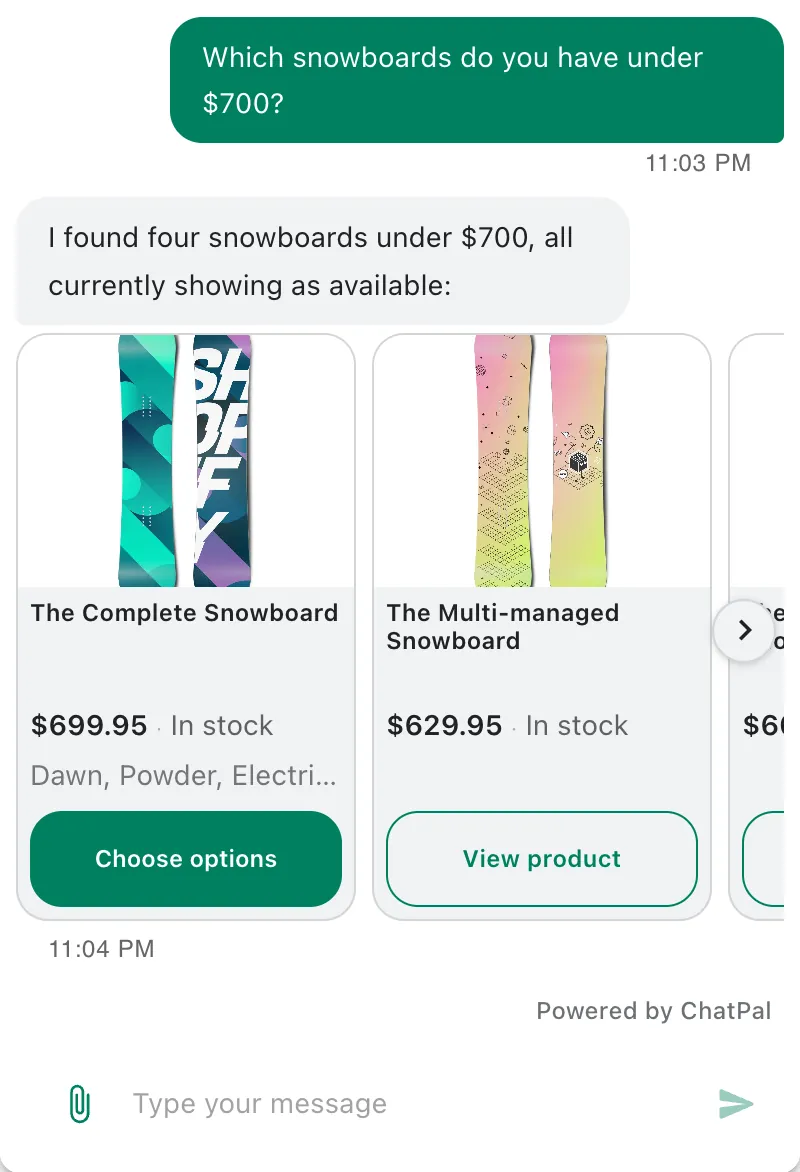
This is ChatPal answering from the live catalog of our own test store.
For more tools that work with Shopify, see the best AI chatbots for Shopify stores. If the AI you want to replace is website-only, the Chatbase alternatives comparison compares credit-based tools.
If you are also weighing Gorgias, see Gorgias alternatives.