
AI for ecommerce: what it actually does for a small store, job by job
Yevhen Kurapov, co-founder · Updated Oct 19, 2026
In a store run by 1 to 10 people, AI for ecommerce pays off first on repeat shopper questions, product description drafts, photo backgrounds and site search, mostly with free tools built into Shopify. Then email drafts. Forecasting needs more order history than most small stores have. A first setup costs $0 to $20 a month beyond your Shopify plan.
For a store run by one to ten people, AI is useful today in four jobs: answering the questions shoppers send before and after they buy, drafting product descriptions and cleaning up photos, making your site search forgive typos and odd wording, and writing first drafts of marketing emails. Forecasting, the fifth job vendors promise, is best left for later: it needs a long order history to learn from. On Shopify, most of these jobs start with tools you already have. We make ChatPal, which covers one part: conversations with shoppers on your website and in messaging apps. The other tools here are someone else's, Shopify's included.
Six jobs, the tools and what they cost
Prices are from each vendor's own page on 19 October 2026, billed monthly in US dollars unless a row says otherwise. The effort column is our estimate for a store with a few hundred products.
| Job | What AI does well today | Tools and prices | Effort to start |
|---|---|---|---|
| Answering shoppers | Finds products from a description; answers stock, size and delivery questions at any hour | Shopify Inbox AI agent: free, store chat only. ChatPal: free for 100 replies a month, $20 for 500, on your site, WhatsApp, Instagram, Messenger and Telegram | An hour to connect and test, then 15 minutes a day for two weeks reading chats |
| Search on your site | Tolerates typos, matches synonyms, suggests related products | Shopify search and the Search & Discovery app: free. Doofinder: from €49 a month (€44 on annual billing), with separate plans for Shopify | An hour for synonyms and filters |
| Descriptions and photos | Drafts a description from your keywords; removes or replaces a photo background | Sidekick drafts descriptions and is included in your Shopify plan; the media editor is free for a limited time | About 5 minutes a product to check the facts |
| Support after the order | Order status, your returns policy, handing the rest to you | Shopify Inbox, and ChatPal's Order support, on as soon as a Shopify store connects: order status for a signed-in customer. Gorgias: $10 a month for 50 tickets, AI Agent $1 per automated interaction | Half a day, once your policies are written down |
| Marketing emails | Subject lines and first drafts | Shopify Messaging: 10,000 emails a month free, then from $1 per 1,000. Klaviyo: free up to 250 active profiles | Under an hour per campaign |
| Forecasting | Demand per product, reorder points, customer value | Prediko: $49 a month for stores up to $100K in revenue. Shopify and Klaviyo predictions: free, once you have the history | A year or more of orders first |
Job by job: what works and where it goes wrong
Answering shoppers
Most small stores get their hours back here. The questions repeat (is it in stock, will it fit, when will it arrive), they come in after hours, and the answers already sit in your catalog and policies.
On Shopify, Shopify Inbox is free, and its AI agent answers product questions, recommends products, looks up orders and adds items to the cart, but only in your store's chat widget, and only on the Basic plan or above. If your customers also write on Instagram or WhatsApp, a tool that answers there from the same catalog saves you a second inbox. ChatPal is one: it answers from a copy of your Shopify catalog that follows your store within minutes, shows product cards, and replies in the customer's language. To judge any of them, our guide to AI shopping assistants has a ten-question test.
Where it goes wrong. Confident wrong answers: a sold-out size offered as available, a made-up shipping cost, a discount that doesn't exist. Ask the vendor where stock and prices come from and what the bot says when the answer isn't in your content, then test it with ten questions you already know the answers to.
Search on your site
Shopify describes its built-in storefront search as AI-powered, and it is on every store with an online store. The free Search & Discovery app adds synonym groups, product boosts, filters and recommendations. For a few hundred products that is usually enough. Paid search tools earn their price on large catalogs with many filters. Doofinder, for one, starts at €49 a month (€44 a month on annual billing) for up to 10,000 requests, and lists separate plans for Shopify stores, so confirm the price for yours.
Where it goes wrong. Search can only find what your product data says. If the material or the fit appears only in a photo, nobody searching "linen" or "relaxed fit" will find the product. Spend the hour on synonym groups for the words your customers actually type, such as "hoodie" and "sweatshirt", and on filling product fields, before you pay for a search app.
Product descriptions and photos
Sidekick drafts a product description in the editor from the title and at least two features or keywords you give it. Shopify's media editor can make a photo's background a plain colour or a scene you describe, and Tinker, Shopify's free mobile app, has more image and video tools. Text generation doesn't work in the iPhone or Android app, so do this at a computer.
Where it goes wrong. Shopify's own help warns that a generated description can include benefits you didn't list or facts drawn from related products, and that you're responsible for what you publish. A wrong material or a care instruction you never gave comes back as a return. Read each draft against the product itself. With photos, change the background and leave the product alone. Generated images come out at about 1 megapixel and carry an invisible watermark, so check them zoomed in on a product page before you replace your originals.
Support after the order
"Where is my order?" is the question that keeps coming after a sale. Shopify Inbox's agent answers it once the customer signs in to your store, and so does ChatPal's Order support, which is on as soon as a Shopify store connects. ChatPal never asks for an order number, so a stranger has nothing to guess. Gorgias suits a team whose support is mostly email: its AI Agent handles tracking, returns, refunds and other order edits across email, chat and text messages. It costs $1 per automated interaction on monthly billing, on top of a plan from $10 a month for 50 tickets, and each interaction also counts as a ticket.
Where it goes wrong. A bot promises a refund your policy doesn't allow, or loops on "Sorry, I didn't understand" instead of passing the chat on. Write down what it may never promise, put that in its instructions, and check that a hand-off reaches a person who can see the whole chat. Our customer service chatbot guide for online stores lists the eight questions a store gets and which ones to hand over.
Marketing emails
Shopify Messaging writes subject lines and email copy, and your first 10,000 emails each month are free, then from $1 per 1,000. Klaviyo is free up to 250 active profiles and 500 sends a month, and paid above that.
Where it goes wrong. The drafts all sound alike. Give the tool the facts (the product, the offer, the date it ends), keep your own phrasing, and cut any claim you can't back up. Klaviyo's predictions, such as each customer's expected spend over the next year and their churn risk, appear only once at least 500 customers have ordered, you have 180 days of order history with orders in the last 30 days, and some customers have ordered three times or more.
Forecasting
Inventory apps such as Prediko ($49 a month for stores up to $100K in revenue, with a 14-day trial) forecast demand per product and manage purchase orders. Shopify's customer reports can project what each group of customers will spend, but the option appears only once you have 24 months of store data.
Where it goes wrong. A forecast learns from your past orders. A store taking a few dozen orders a month hasn't given it much to learn from, and a launch, a sale or one wholesale order throws it off. Until you have a year or two of steady sales, a spreadsheet with each product's supplier lead time and minimum stock does the same job, and you can see how it got its numbers.
What we learned building store assistants
We build store assistants that answer from Shopify and Horoshop catalogs. Most of the work is the rules around the AI model, and five of them apply to whatever tool you pick:
- Check stock at the moment of the question. Our assistant looks the product up again, in a catalog copy that follows Shopify within minutes, instead of repeating what it said earlier in the chat.
- A near miss is not an answer. When nothing meets every requirement, the assistant says so and asks which one to relax. Showing a $95 jacket to someone who asked for one under $80 is how a shopper stops trusting the chat.
- A sale is what the store says it is. We call something discounted only when the store sends its previous price. A low price, or a collection someone named "SALE", isn't proof.
- Customers don't use your words. A shopper asking about "rebajas" in Spanish shares no words with a collection called "Sale". Our assistant reads the store's collection names first and picks the right one.
- Shipping costs and delivery dates aren't product data. The assistant never reads them off a product. It points the shopper to your policies or your team instead of estimating a number.
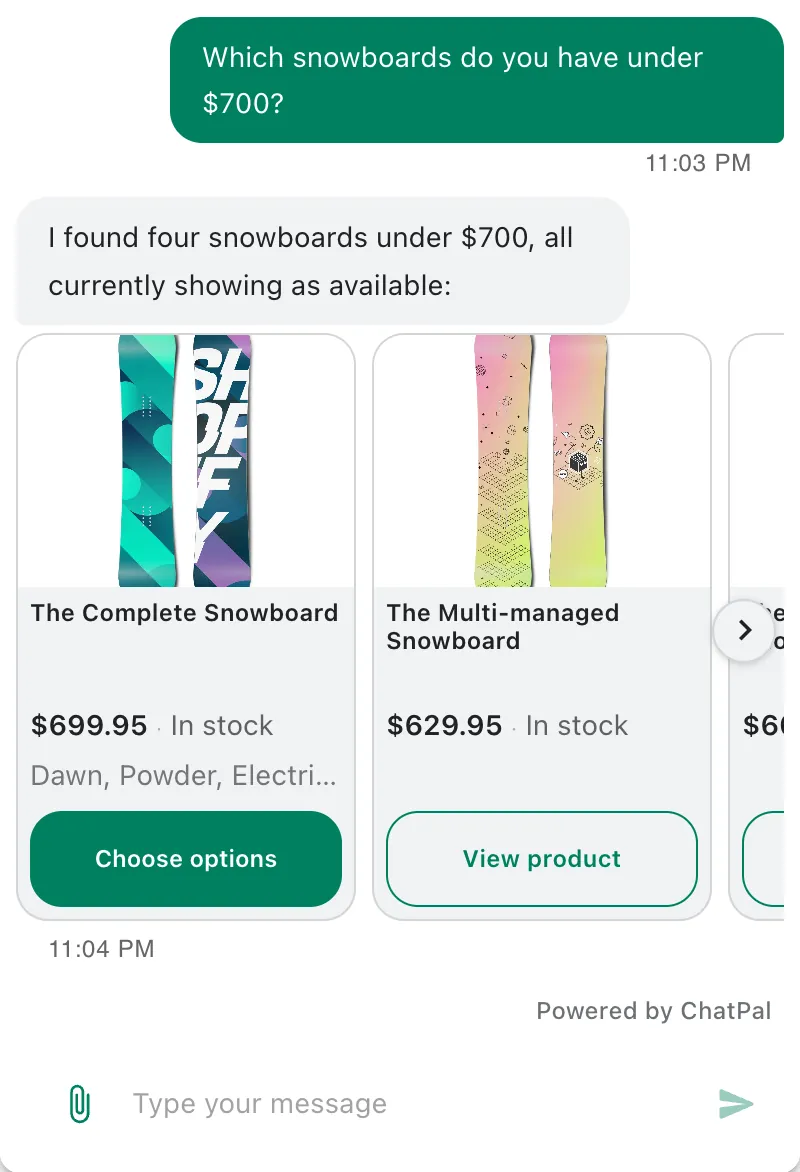
Here is rule 2 in an example conversation we wrote for this page, set in a fictional outdoor clothing store:
Customer: Do you have a waterproof jacket under $80?
Assistant: None of our jackets is both waterproof and under $80. Would you rather raise the budget, or look at jackets under $80 that aren't waterproof?
Customer: I can go up to $120.
Assistant: These two waterproof jackets are under $120 and in stock.
[Card: Harbor Shell Jacket, $109, in stock]
[Card: Ridge Rain Jacket, $96, in stock]
AI agents: what the word means for a store
Vendors now call almost everything an agent. The useful line: a chatbot answers, an agent also acts in your systems, by looking up an order, adding to a cart, editing a product or processing a return.
- On your side of the counter, Sidekick in your Shopify admin can analyse data, manage orders and edit products, and it shows you each change before applying it. Sidekick vs a shopping assistant explains where one stops and the other starts.
- On the shopper's side, Shopify Inbox's agent and ChatPal add products to the cart in a Shopify storefront's chat, and Gorgias's AI Agent processes returns and edits orders.
- Outside your store, ChatGPT, Copilot and Google's AI Mode now recommend products and pass shoppers to a checkout. That's agentic commerce, and our guide to agentic commerce for small stores covers what's live.
Give a new agent read access first, then add actions one at a time, each with a limit. ChatPal never changes your products, orders or settings. It adds to the cart only when the customer asks and the size or colour is settled, and it passes cancellations and delivery changes to you once the customer confirms.
What to start with
In this order, for most stores of one to ten people:
- Count last month's messages. Sort them into repeat questions you've answered before, order questions and real problems. If repeat questions come in more than a handful a day, a chat assistant is your first AI tool.
- Use what Shopify already gives you. Description drafts, photo backgrounds, synonym groups in Search & Discovery. An afternoon is enough to try them.
- Add a shopping assistant where customers write. Shopify Inbox if it's only your store chat; a tool that also covers Instagram and WhatsApp if they write there too.
- Let AI draft your emails once you send at least one campaign a month.
- Leave forecasting until you have more than a year of steady orders.
A worked example
Assumptions for a three-person Shopify store, to replace with your own: 120 products with 10 new each month, 5 customer questions a day across the store chat and Instagram at 3 replies each, and 1,200 email subscribers who get two campaigns a month.
| Job | Tool | Monthly cost |
|---|---|---|
| Questions on the site and Instagram | ChatPal Starter: about 450 replies, inside its 500 | $20 |
| Site search | Shopify search and Search & Discovery | $0 |
| Descriptions and photos | Shopify's built-in tools, if your plan has them | $0 extra |
| Shopify Messaging: 2,400 emails, inside the free 10,000 | $0 | |
| Forecasting | Not yet | $0 |
| Total on top of your Shopify plan | $20 |
If every question arrives in your store chat, Shopify Inbox brings that to $0. The time cost is larger than the money: about half a day to set up, 15 minutes a day for two weeks reading the assistant's chats, and about an hour a month checking ten new descriptions.
Above Starter, ChatPal's Standard plan is $50 for 1,500 replies and Pro $120 for 4,000, with every channel on every plan (pricing, checked 19 October 2026). Replies to your own test chats count too. What it does with a store is on the e-commerce page.