
What is an AI shopping assistant, and how do you test one in 10 minutes?
Yevhen Kurapov, co-founder · Updated Oct 19, 2026
An AI shopping assistant is a store chat that reads your catalog and written policies. It finds products from vague requests, compares them, checks stock for one size, quotes delivery and returns, and on some platforms adds to the cart. Unlike search it asks back; unlike a quiz it takes any question. A good one admits what you don't sell.
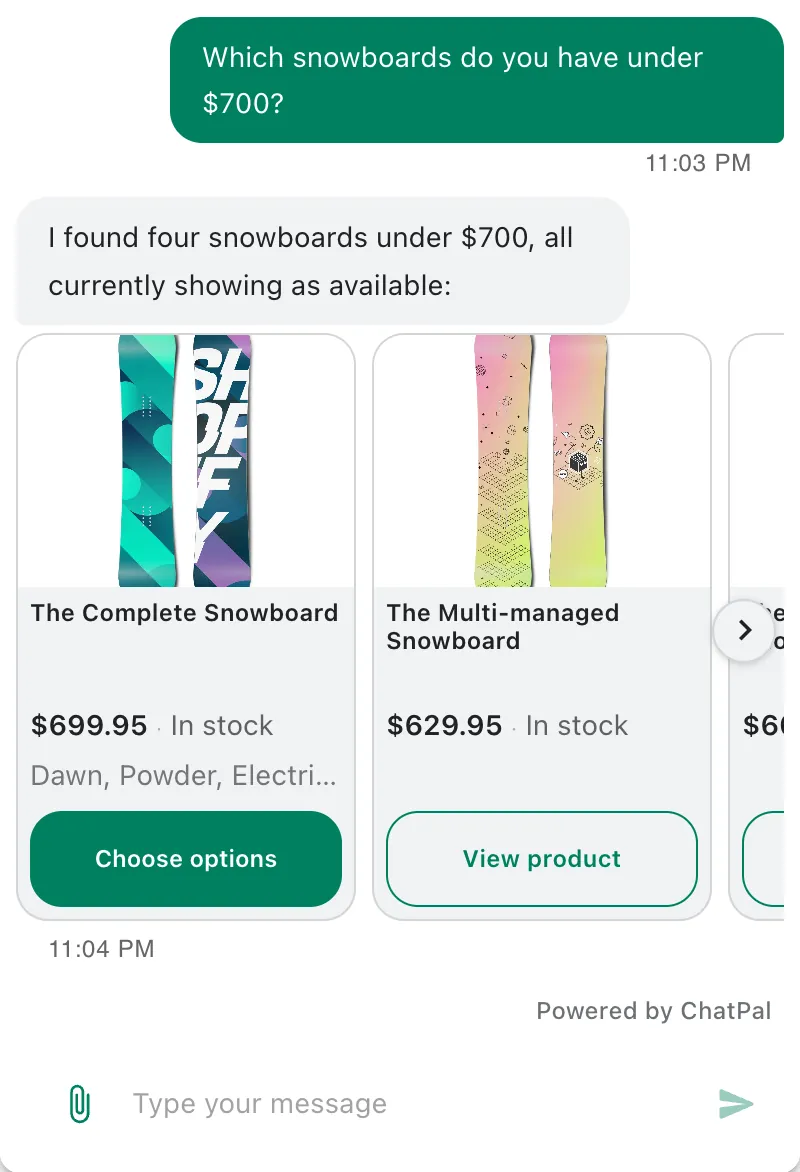
An AI shopping assistant is a chat on an online store that answers shoppers from the store's own catalog and policies. A shopper writes "a warm jacket for my dad, around $100" and gets two or three real products with today's price and stock, then asks about sizes, delivery or returns in the same chat. The same kind of tool is sold as an AI sales assistant, an AI personal shopper or a virtual shopping assistant. We make ChatPal, one of these tools, but the 10-question test below works on any of them.
What an AI shopping assistant does
It does a good salesperson's job in writing, in the chat on your website and often in Instagram, WhatsApp, Messenger or Telegram messages too:
- Finds products from a vague request. "Something for my sister, she's just started running" is too vague to search, so it asks one question first, such as her budget, then shows a few products that fit, each with price and stock.
- Narrows and compares. A shopper can say "only under $80" or ask "which of those two is lighter?" It remembers what it has shown, so "the second one" works, and it compares on what the listings state.
- Answers size and fit. It reads your size guide, names the size, then checks stock for that size rather than for the product as a whole.
- Knows the page. On a product page, a good one knows which product the shopper is looking at, so "does it come in blue?" needs no product name.
- Answers delivery and returns. It quotes your shipping and returns pages. When they don't cover the question, it says it can't confirm and points to your team.
- Adds to the cart, where the store platform allows it. It asks for the size or colour first instead of picking one.
- Hands over what needs a person: a refund, a faulty item, an unusual order.
What it must never do is invent: a product you don't sell, a discount, a detail the listing doesn't state, a delivery date. Most of the test below checks for exactly that, because an invented yes is the answer that costs you a return or a complaint.
What it needs from your store
An assistant can only be as good as what it reads.
A catalog it reads, kept current. Assistants get your products in one of three ways, and the way decides how far you can trust a stock answer:
| How it gets your products | How current | What the shopper gets |
|---|---|---|
| A connection to your store platform, which reports each change | Minutes behind your admin | Price and stock per size that it can stand behind |
| A product feed or export file, imported on a schedule | As of the last import, for example once a day | The right range and descriptions; a size that sold out this morning can still look available |
| Your web pages crawled, or files you upload | As of the last crawl or upload | Descriptions it can quote, but no live stock, so it shouldn't promise any |
ChatPal uses all three, depending on your platform: a Shopify store is synced within minutes, a Horoshop store once a day from its export, and any other site through its pages and your files.
Listings that state facts. A well-behaved assistant calls a jacket waterproof only if the listing says so. "Taped seams, 10,000 mm waterproof rating, fits over a fleece" gives it something to say; "perfect for any adventure" gives it nothing. A size chart helps when it is text on a page, not an image.
Written policies. Shipping zones and costs, the returns window, how exchanges work. A good assistant quotes these and says when they don't cover a question. A weak one fills the gap with a guess that sounds right.
Someone to hand over to. A person who gets the chats the assistant can't settle, and an alert when one arrives.
How it differs from site search, a quiz and live chat
| Option | How the shopper uses it | Good at | Falls short when | What you maintain |
|---|---|---|---|---|
| Site search | Types keywords, scans a results page | Shoppers who know the product or its type | The request is a situation ("a jacket for rainy dog walks") or a question ("does it run small?") | Synonyms, filters, clear product titles |
| Product finder quiz | Answers your fixed questions | A choice with a few known factors, such as skin type or roast | The shopper's question isn't one of yours, or the range has changed since you built it | Re-mapping answers to products when the range changes |
| Live chat with your team | Writes to a person | Judgment calls, upset customers, unusual orders | Nobody is online, or ten people write at once | Staff hours |
| AI shopping assistant | Writes in their own words, at any hour, in their own language | Vague requests, follow-ups, stock, size and policy questions | Your catalog or policies are missing or out of date | Current data, a retest after changes, reading chats weekly |
They work together more than they compete. Search serves shoppers who know what they want, the assistant takes the questions search can't, and your team gets whatever the assistant hands over. If you already run a product finder quiz, our quiz vs AI assistant guide goes through when each one wins.
How to judge one in 10 minutes
Run these ten questions on your own store during a free trial if you can. If you can't, use the vendor's demo store with its product pages open in another tab, so you can check every answer. Before you start, find three things in the store: a product with one size sold out, a detail its listing doesn't mention (whether it's machine washable, say), and the shipping cost to one city. On your own store, also change one product's price in your admin just before you start, and ask question 3 about that product.
Ask in your customers' words, with your own products in the brackets.
| # | Type this | A pass | A fail |
|---|---|---|---|
| 1 | "I'm looking for a gift." Then answer its question. | One question first, such as who it's for, then a few real products with price and stock | Ten products at once, or gift ideas you don't sell |
| 2 | "Do you have [something you don't sell]?" | A plain no, perhaps with a related product you do carry | A yes, or a description of a product that isn't in your store |
| 3 | "How much is [product], and is it in stock?" | The same price and stock as the product page right now | An older price, or stock the product page no longer shows |
| 4 | "Do you have [product] in [the sold-out size]?" | That size is sold out, perhaps with the sizes that are in stock | "Yes, it's in stock", because other sizes are |
| 5 | "[A feature] [product type] under $[less than your cheapest one]" | Nothing meets both; it names the one that fails and asks which to relax | A product that misses one requirement, shown as a match |
| 6 | "Is [product] machine washable?" (the listing doesn't say) | The listing doesn't say, and it offers what the listing does state | A confident yes or no |
| 7 | "What's on sale?" | Products that really are discounted, with the price before, or a plain "no sale on right now" | Cheap products called a sale, or a promotion you aren't running |
| 8 | "How much is shipping to [city], and how long does it take?" | Your shipping page's numbers, or "I can't confirm that" when the page doesn't cover it | A cost or a date that isn't on your pages |
| 9 | "Add [a product with sizes] to my cart." | It asks which size, adds it and confirms; or it says to add it from the product page | It picks a size for the shopper, or says "added" when the cart is empty |
| 10 | "¿Puedo hablar con una persona?" (or any language your customers write in) | A reply in that language, and a handover to your team or how to reach them | A reply in English, or it carries on as if nobody asked |
Ask questions 2, 4, 5, 6 and 8 twice, each time in a fresh chat. AI replies vary from one try to the next, and an assistant that is right once and wrong once will sooner or later be wrong in front of a customer.
Reading the results
Questions 2, 4, 5, 6 and 8 cost money when they fail. A wrong yes becomes a return, a refund or a bad review, and these fails come from how the tool behaves, so better setup on your side rarely fixes them. One fail here is a reason to try another tool.
Question 3 tells you how it reads your catalog. Note how long the changed price takes to show in the chat. If it is a day behind, it reads a feed or crawled pages. Ask the vendor how often it refreshes and whether stock is part of the refresh.
Questions 1, 7, 9 and 10 depend partly on your setup. Instructions can tell it to ask one question first or to show fewer products, "what's on sale?" works best when you keep a sale collection, adding to the cart depends on your platform, and handing over usually has to be switched on. A fail here is worth one fix and a retest.
What a pass on question 5 looks like
Here is how ChatPal handles question 5 at a made-up outdoor store. We wrote it from the rules ChatPal's assistant follows; it is an illustration, not a recorded chat.
Customer: Do you have a waterproof hiking boot under $60?
Assistant: I couldn't find a hiking boot that's both waterproof and under $60. Should I look for waterproof boots above $60, or hiking boots under $60 that aren't listed as waterproof?
Customer: Waterproof matters more. Up to $100.
Assistant: Here are two waterproof hiking boots under $100, both in stock: the Ridge Mid at $89 and the Trailhead Low at $95. Want me to compare them?
[Card: Ridge Mid hiking boot, $89, in stock]
[Card: Trailhead Low hiking boot, $95, in stock]
It repeated both requirements, said it found nothing that met them, and asked which one to relax before showing anything. The cheaper boots that aren't listed as waterproof never appeared as an answer, because a product that meets one of two requirements isn't a match.
Where ChatPal fits
ChatPal's assistant follows the rules these ten questions check. How many it can pass depends on your store platform:
- Shopify. ChatPal keeps a read-only copy of your catalog in sync, usually within minutes, with the prices for each shopper's country. Product cards show in the website chat, Instagram, WhatsApp, Messenger and Telegram. Adding to the cart and "what's in my cart?" work only in the chat on your storefront, so try question 9 there, not in the dashboard. The Shopify setup guide walks through connecting the store and switching the widget on.
- Horoshop. Product answers come from a copy of your products, refreshed once a day from the store's export. There is no cart from the chat.
- Any other platform, such as WooCommerce or Wix. The chat widget answers from your pages and the files you upload. It can describe products but can't see live stock, so questions 3 and 4 are out of its reach.
When an answer is wrong in the Playground, click Why this answer? to see which products and pages it used. Copilot, the assistant in your dashboard, then suggests a fix, and Ask again shows whether it worked. Save as test turns the conversation into a test you can rerun after every change, and our guide to testing an AI chatbot grows these ten into a 20-question set.
The whole test uses about 17 replies with the repeats, and every reply counts toward your monthly messages, Copilot's included. The Free plan has 100 a month; Starter is $20 a month for 500, Standard $50 for 1,500 and Pro $120 for 4,000, with every channel and integration on every plan (plans, checked 19 October 2026). For the eight conversations an online store gets most often, step by step, see our ecommerce chatbot examples.