
Ecommerce chatbot examples: eight online store conversations, step by step
Yevhen Kurapov, co-founder · Updated Oct 19, 2026
Eight ecommerce chatbot examples for an online store's customer service. ChatPal's assistant asks one question when a request is vague, checks stock before answering, offers only in-stock alternatives, quotes your shipping and returns pages, adds to the cart on a Shopify storefront, reads orders only after sign-in, and hands the rest to your team.
Eight situations come up in almost every online store's chat: a shopper who doesn't know what they want, a size question, a sold-out item, delivery, returns, adding to the cart, order status, and a question the assistant can't answer. Below is one example conversation for each, at a made-up outdoor clothing store, with what made it work and what the owner set up. We make ChatPal and wrote these from the rules its assistant follows, so they show the real order of steps and where it stops. They are illustrations, not recorded chats, so your own assistant's wording will differ.
The eight situations at a glance
| Situation | What the assistant does | What it needs | Where it works |
|---|---|---|---|
| Vague request | Asks one question, then shows up to five products | A connected Shopify or Horoshop store | Every channel |
| Size or fit | Answers from your size guide, checks that size's stock | Your size chart as text | Every channel |
| Out of stock | Says so first, offers an in-stock item from the same collection | Collections in your store | Every channel |
| Delivery | Quotes your shipping page, never guesses a date | Your shipping page | Every channel |
| Returns | Quotes your policy; the decision stays with you | Your returns page | Every channel |
| Add to cart | Asks for the option, adds it, shows the cart | Shopify and the app embed | Shopify storefront chat only |
| Order status | Signs the customer in, then reads their order | Shopify order support | Website, WhatsApp, Instagram, Telegram |
| Can't answer | Says so, hands the chat to your team | Hand-off switched on | Every channel |
1. Finding a product from a vague description
Customer: I'm looking for a gift. Any ideas?
Assistant: Happy to help. Who is it for?
Customer: My dad. He walks the dog every morning, rain or shine. Around $100.
Assistant: For wet morning walks, here are three things under $100: the Packable Rain Jacket at $89, listed as waterproof with taped seams, the Merino Liner Gloves at $34 and the Waterproof Knit Beanie at $28. Want me to narrow it down?
[Card: Packable Rain Jacket, $89, in stock]
[Card: Merino Liner Gloves, $34, in stock]
[Card: Waterproof Knit Beanie, $28, in stock]
What made it work. "A gift" is too vague to search, so the assistant asked the one question that narrows it most before showing anything. Then it searched for the kinds of products that suit wet walks. It called the jacket waterproof because the listing says so, and nothing "perfect for dog walks", because no listing says that.
What the owner set up. A connected Shopify store, which ChatPal copies and keeps in sync within minutes, and product descriptions that state materials, waterproofing and warmth. Replies show up to five cards; an instruction such as "show at most three products" lowers that. The Shopify setup guide walks through the connection.
2. Sizing and fit
Customer: I'm 42 inches at the chest. M or L in the rain jacket?
Assistant: By our size guide for men's jackets, a 42-inch chest is an L (the L row is 41 to 43 inches). The L is in stock in Navy and sold out in Olive.
Customer: Does it run small?
Assistant: The size guide doesn't say it runs small or large. Its fit note says to size up if you'll wear a thick fleece underneath.
What made it work. It answered from the store's size guide, named the row it used, and checked stock for that size in each colour, not for the jacket as a whole. It said what the guide doesn't cover only because the customer asked.
What the owner set up. The size chart as text on a store page, not an image, with fit notes in plain sentences, and that page listed under Knowledge on the Website & links tab. Our size chart guide shows the format.
3. Out of stock, with a real alternative
Customer: Do you have the Waterproof Hiking Boot in a men's 10?
Assistant: The Waterproof Hiking Boot is sold out in men's 10 right now. From the same Hiking boots collection, the Mid Trail Boot is in stock in 10 and is also listed as waterproof. Want me to show it?
Customer: Maybe. Will the other one be back in a 10?
Assistant: I can't confirm a restock date here. If you leave your name and phone number, the team can let you know when the 10 is back.
[Contact form: name and phone]
What made it work. The first sentence says no. The one alternative shares a real link with the request, the same collection and the same stated feature, and is in stock in that size; the assistant offered it rather than pushing it. It didn't invent a restock date and asked for a contact instead, once, saying why.
What the owner set up. Collections that name a kind of product, such as Hiking boots, which the assistant picks alternatives from. Lead capture, on for new assistants, asks for a name and phone number (tick Email under Contact details to collect to add email), and the details land in Leads.
4. Delivery time and cost
Customer: How much is shipping to Denver, and how long does it take?
Assistant: Standard shipping in the US is $6.95, free on orders over $75, and takes 3 to 5 business days. Orders placed before 1 pm Eastern ship the same day.
Customer: So will it arrive by Friday?
Assistant: I can't promise a delivery day. If you need it sooner, express shipping takes 1 to 2 business days for $18.
What made it work. Shipping isn't product data, so it quoted the store's shipping page exactly and didn't work a delivery date out of it. For a country the page doesn't list, it would say it can't confirm that and point to the store's team, without estimating a cost.
What the owner set up. A shipping page with numbers: zones, costs, the free-shipping threshold, the order cutoff and delivery times. ChatPal reads it when you connect Shopify, as part of your plan's link allowance; check that it appears under Knowledge on the Website & links tab, and after you edit it, choose Reindex on its link.
5. The returns policy
Customer: I bought a fleece last week and it's too big. Can I send it back?
Assistant: Yes. You can return it within 30 days of delivery if it's unworn with the tags on, and returns within the US are free. Start the return from your order status page; refunds go back to your original payment within 5 to 7 business days of the return reaching us.
Customer: Can I swap it for a medium instead?
Assistant: Our returns policy handles an exchange as a return and a new order: send back the large for a refund and order the medium. Want me to check the medium is in stock?
What made it work. It quoted the window, the condition and the refund time as the returns page states them and said how to start, without approving this return or promising a refund. Had the page said nothing about exchanges, it would have said it can't confirm that rather than make up a process.
What the owner set up. A returns page with numbers: the window, the item's condition, who pays return shipping, how exchanges work and how long refunds take. The assistant repeats only what is written there.
6. Adding to the cart in the website chat
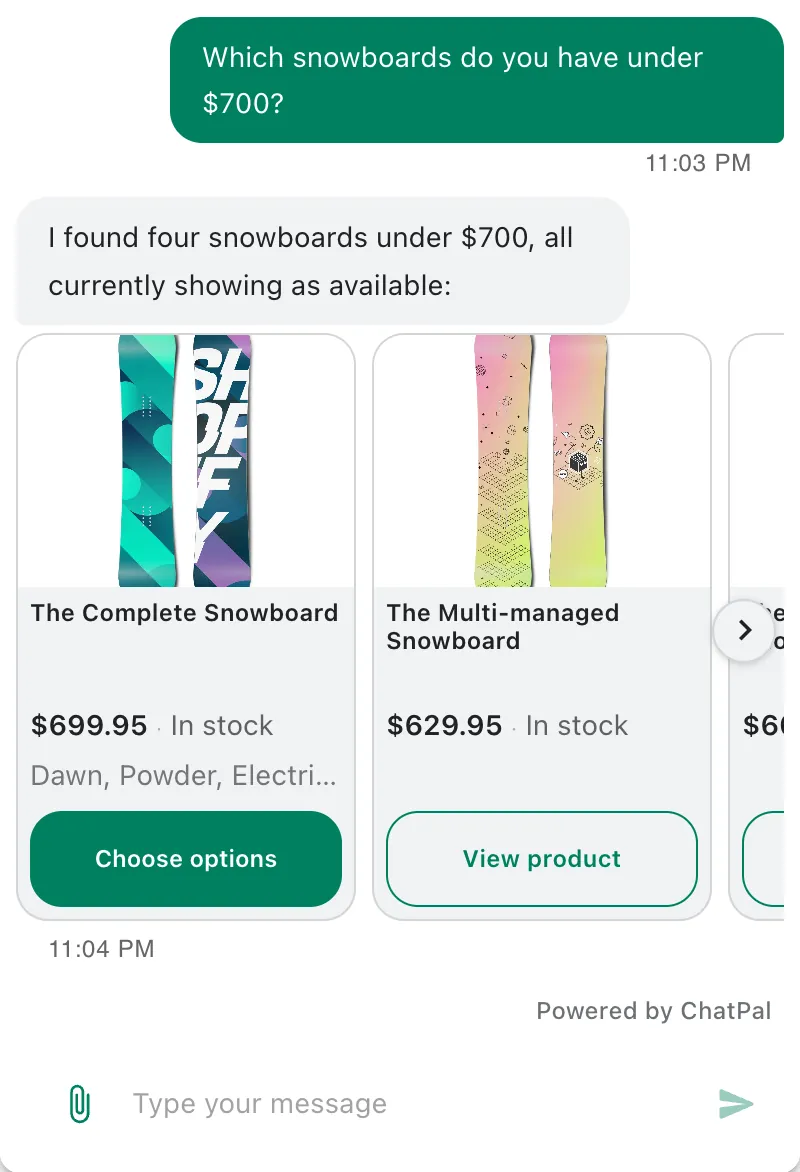
Customer: Add the beanie to my cart.
Assistant: Which colour would you like: Charcoal, Navy or Rust?
Customer: Navy.
Assistant: I've added one Waterproof Knit Beanie in Navy to your cart. You can check out whenever you're ready.
[Confirmation with a View cart link]
Customer: What's in my cart now?
Assistant: You have 2 items in your cart, $117 in total.
[Card: the cart, with the rain jacket the customer added earlier from its product card and the beanie, each with its quantity and price, the total and a Checkout button]
What made it work. The customer asked outright, so the assistant added the beanie it had already shown. With three colours on offer, it asked which one rather than picking, and it reports an add only when the store confirms it. The cart answer is one line because the card lists every item.
What the owner set up. A connected Shopify store and the ChatPal Chat Widget switched on under App embeds in the theme editor. It works only in the storefront chat, 1 to 10 of an item at a time; elsewhere the card links to the product page. Checkout, discount codes and changing items already in the cart stay with your store.
7. Order status for a signed-in customer
Customer: Where's my order?
Assistant: Please sign in to your store account so I can check.
[A Continue button under the reply. The customer taps it; they're already signed in to the store, so the small sign-in window closes by itself.]
Assistant: Your latest order, #1047, has shipped and is on its way with UPS.
[Card: order #1047, shipped, UPS tracking link, estimated delivery, 2 items, link to the order status page]
Customer: Can I still cancel it?
Assistant: Order #1047 has already shipped, so it can't be stopped before it arrives; a return is the usual route then. Shall I send the team a cancellation request for #1047 anyway?
[Buttons: Send request · Keep my order]
What made it work. The store sign-in decided whose orders it could see; it never asks for an order number, email or phone number to identify anyone. A plain "where's my order?" means the latest order, so it named that one and left tracking to the card. On the cancellation it explained what's possible and asked first: nothing reaches the store without the customer's yes, and it never says an order is cancelled.
What the owner set up. Nothing beyond the Shopify connection: Order support comes on with it and needs Shopify's new customer accounts. A store connected before 12 October 2026 turns it on with Grant order access on the Shopify page in ChatPal. On WhatsApp, Instagram and Telegram the assistant sends a sign-in link instead, and it doesn't work in Zendesk. Our order status guide covers the whole flow.
8. A question it can't answer, handed to a person
Customer: The zip on my rain jacket broke after two weeks. Is that covered?
Assistant: I can't confirm how a broken zip is handled from here, so our team is the right place for this.
Customer: Can I talk to someone?
Assistant: I've passed your message to our team, and they'll reply in this chat. In case you leave the page, you can leave your contact details below.
[Contact form: name and phone, with Send and No thanks]
What made it work. With nothing about warranty on the store's pages, it didn't invent a policy. Asked for a person, it handed the chat over in two sentences, promised no reply time and went quiet in that chat. The form lets the team reach a website visitor who closes the tab.
What the owner set up. Hand off to a human when needed, in Configuration on the Handoff & leads tab; it's off by default. The chat then waits in Chats under Handed off to a human, every workspace member is alerted by email, Telegram or in the app, as each chooses, and the team replies from ChatPal; Return to AI hands it back. A category on the Automation tab with Human escalation as its behaviour passes faulty-item messages over without waiting to be asked.
Try them on your own store
Open Playground in ChatPal, the same chat your customers get, and ask these questions about your own products and policies. Where an answer is wrong, click Why this answer? to see what it read, fix the source, and click Ask again. Try examples 6 and 7 on your live storefront, as a customer would.
Every assistant reply counts toward your monthly messages, tests included. The eight conversations above have 18 assistant replies, so running them all uses about 18 of the Free plan's 100. Paid plans are $20 a month for 500 replies, $50 for 1,500 and $120 for 4,000, with every channel on every plan (plans, checked 19 October 2026).
Which questions to hand to an assistant in the first place is in our customer service chatbot guide for online stores, and conversations for salons, clinics and other businesses are in AI chatbot examples.