
Shopify Sidekick vs an AI shopping assistant: what each one does
Yevhen Kurapov, co-founder · Updated Oct 19, 2026
Sidekick is Shopify's AI assistant for you and your staff inside the Shopify admin. It reports on sales, edits orders and products, writes copy, and asks before applying changes. Shopify says it can't talk to your customers. Shoppers need a separate assistant: Shopify Inbox's free agent in your store chat, or ChatPal, which also answers WhatsApp and Instagram.
Sidekick works for you; a shopping assistant works for your customers. Sidekick lives in your Shopify admin, where it pulls reports, edits orders and products, and drafts copy for you to approve. Shopify's own help center says it "can't talk to your customers or handle customer support conversations on your behalf". So the two don't compete. A store that wants AI on both sides of the counter runs Sidekick plus one shopper-facing assistant, and lets what shoppers ask decide what to fix with Sidekick.
We make ChatPal, one of those shopper-facing assistants. The table below puts Shopify's documentation next to ours, and includes Shopify Inbox's free agent, which does the shopper side inside your store chat.
Shopify AI, sorted by who it talks to
"Shopify AI" covers three different things, and they are easy to mix up.
- You and your staff, in the admin. Sidekick, plus the generate buttons in the product and blog editors, theme block generation, image edits and the free Tinker app for images and video. Shopify says many of these cost nothing extra, though what you get varies by plan, device and language.
- Shoppers in your store. Shopify Inbox is a free chat app, and its optional AI agent answers shoppers in your store's chat window. Third-party assistants such as ChatPal answer there too, and some also answer in messaging apps.
- Shoppers outside your store. Agentic storefronts put your catalog in ChatGPT, Google AI Mode and Gemini, Microsoft Copilot and Meta. They're on by default for eligible stores, and you manage them under Sales channels, then Agentic. Our guide to Shopify MCP for merchants covers that side.
This page is about the first two.
Side by side
| Sidekick | Shopify Inbox agent | ChatPal | |
|---|---|---|---|
| Who it talks to | You and your staff, each within their admin permissions | Shoppers | Shoppers; your team takes over when a chat is handed off |
| Where it works | Shopify admin on desktop; the Shopify app on phone and tablet, not a mobile browser; voice questions on Apple Watch | Your online store's chat window only | Website chat (Shopify app embed, or any site), WhatsApp, Instagram DMs, Messenger, Telegram, Zendesk |
| What it reads | Your Shopify data, the admin page you're on, files you attach, installed apps that support Sidekick | Your catalog, policies, store pages and the knowledge you add | A read-only copy of your catalog that follows your store within minutes, with each market's prices; your store's pages and files you add |
| What it can change | Orders, draft orders, products, discounts, collections, customers, policies, theme settings and Flow workflows, each after you approve | Adds recommended products to the shopper's cart | Nothing in your store. In your storefront chat it adds products to the shopper's cart when they ask, 1 to 10 at a time |
| Orders | Edits an order; the change applies only when you click Update order | Order status once the customer signs in | Status, tracking and estimated delivery once the customer signs in; cancel and delivery-change requests are passed to you |
| Customer conversations | None. Shopify says it can't handle them | Hands off to your staff; if nobody is available, gives the shopper your store's email | Hands the chat to your team in ChatPal, with an email or Telegram alert |
| Languages | Follows your store's language settings; works in multiple languages | Replies in the shopper's language | Replies in the shopper's language |
| Cost | Included with your Shopify plan; features and usage limits vary by plan | Free app on Basic or higher; the agent needs new customer accounts | Free for 100 replies a month; Starter $20 for 500, Standard $50 for 1,500, Pro $120 for 4,000, billed monthly |
Shopify's columns come from its help center and Sidekick page, checked on 19 October 2026. ChatPal's come from our product documentation and pricing page.
What Sidekick can do today
Sidekick opens from its icon in your admin, or from the Sidekick field in Shopify's refreshed admin design. It uses the admin page you're on as context, and you can attach files to a question. Each staff member can use it within their own admin permissions. According to Shopify's help center, it handles:
- Reports. It writes ShopifyQL queries, draws line, bar and donut charts, and exports results to CSV and other formats. Ask for last month's best sellers and you get the numbers without building a report.
- Orders. It edits existing orders (quantities, products, line discounts, custom shipping) and creates draft orders. Nothing is saved until you click Update order or Save.
- Store data. It fills in the forms for products, discounts, collections, customers and B2B companies, and highlights what it filled in purple so you can check it. It also updates metafields and builds customer segments from a plain description.
- Policies. It inserts Shopify's policy templates or drafts a policy, and asks before replacing your text. It can't change your privacy policy.
- Content. It drafts blog posts, product descriptions and email copy, and generates images such as banners. Image generation has monthly limits shared by everyone in the store.
- Theme and automation. It changes theme settings, adds sections and blocks your theme already has, and builds Shopify Flow workflows while the Flow app is open.
- Apps and skills. It generates simple custom apps for your admin, works with installed apps that support it (asking you first), and saves a prompt you repeat as a skill.
- Pulse. Some stores see up to five suggested actions on the admin Home page. Shopify calls Pulse early access; it needs recent sales and Shopify Network Intelligence turned on.
What it can't do
- Talk to your customers or answer support conversations for you.
- Change anything without your approval.
- Change your checkout configuration directly. It answers questions and links you to the setting.
- Run in a mobile browser. On a phone, you use the Shopify app.
- Edit images inside your theme or product list.
That's the scope Shopify chose. Sidekick is built for the person running the store, and it reads data, such as sales and customer records, that no shopper should see.
What shoppers still need answered
While you're in the admin, or asleep, shoppers are asking things like:
- "Is this shirt in medium still in stock?"
- "How long does shipping to Canada take?"
- "Which of these two jackets is warmer?"
- "Where is my order?"
Each needs an answer while the shopper is still on the page, in their language, from your current stock and your written policies. Sidekick can tell you tomorrow which products sold; it can't answer the shopper tonight.
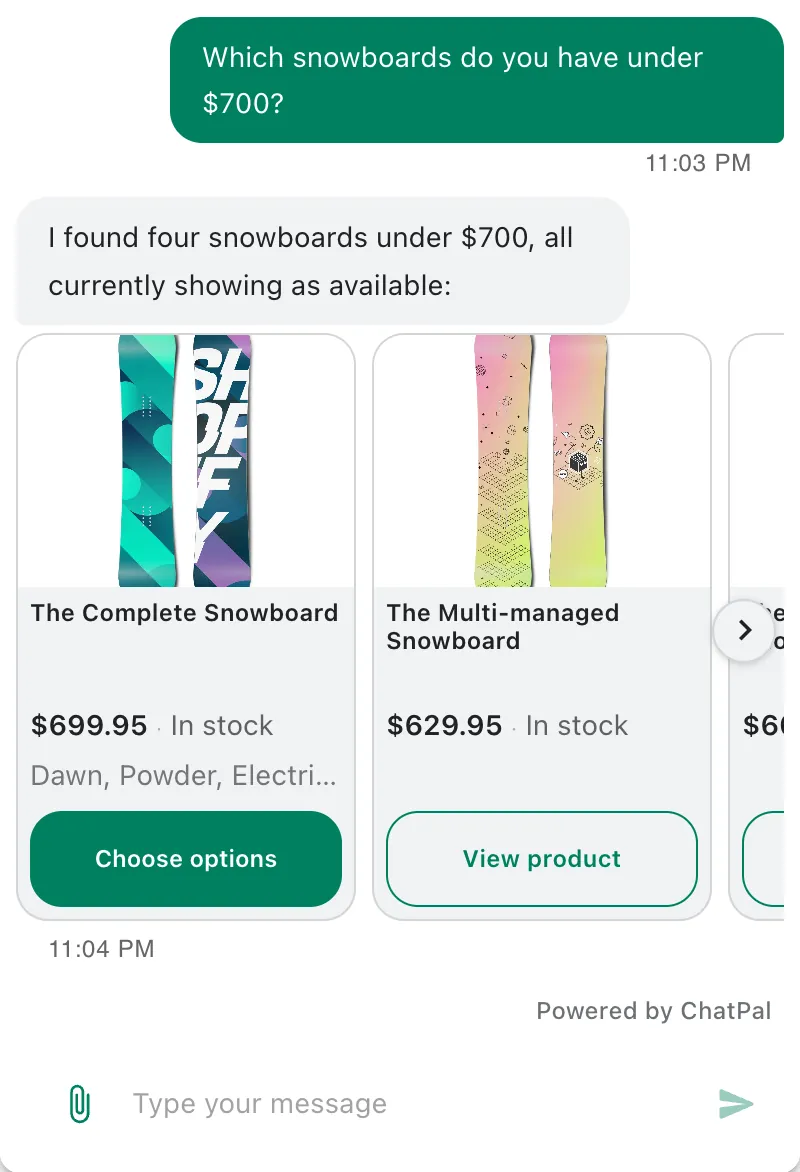
A shopper-facing assistant answers in the chat or app the shopper used. Here is an example conversation showing how ChatPal handles two of those questions, for a made-up clothing store, in its storefront chat:
Customer: Is the Coastline linen shirt in medium still in stock? And how long does shipping to Canada take?
Assistant: Yes, the Coastline linen shirt is in stock in Medium, at $68. Our shipping page says orders to Canada arrive in 5 to 8 business days, and shipping there costs $12. Would you like me to add the Medium to your cart?
Customer: Yes please.
Assistant: Done: one Coastline linen shirt in Medium is in your cart. You can check out whenever you're ready.
It checked the Medium itself, not the shirt in general, and took the shipping figures from the store's own shipping page instead of guessing them. It added to the cart only after the shopper said yes, and the shopper sees a View cart link under the confirmation. Adding to the cart works in your storefront chat only; on WhatsApp, Instagram, Messenger or Telegram the assistant points the shopper to the product instead.
How the two fit together
Sidekick changes your store, and the shopping assistant reads it. The useful habit is a weekly loop: see what shoppers asked, then fix the store with Sidekick.
- Read what shoppers asked. Your ChatPal conversations live in ChatPal, not in Shopify, so Sidekick can't see them. Ask ChatPal's Copilot what customers have been asking about, or read the Chats list, and note the questions the assistant couldn't answer.
- Add the missing product facts with Sidekick. If shoppers keep asking whether a shirt is see-through or how a fit runs, the answer isn't in your listing. Ask Sidekick to draft that line for the products concerned, check the fields it highlighted, and save. ChatPal's copy of your catalog usually picks up a product change within minutes, so the next shopper gets the answer.
- Build the collections shoppers ask for. "Gifts under $50" or "what's new this week" is answered best from a collection. Sidekick can create one from a description. ChatPal reads your collections and lists up to 10 products from one, in the order you set. Ask the question in ChatPal's Playground the next day to check.
- Mark sales so the assistant can see them. ChatPal calls a product discounted only when it has a compare-at price in Shopify, the "was" price. Shopify itself treats sale prices and discounts as different things: a discount code or automatic discount, made by hand or with Sidekick, gives the product no "was" price. For a weekend code, add it in ChatPal under Knowledge, Q&A & snippets, Promotions, and the assistant can quote it.
- Update a policy, then have ChatPal read it again. Sidekick can insert Shopify's return policy template and fill in your details. ChatPal keeps the version of each page it read, so after a change, open Knowledge, then Website & links, and choose Reindex from the ⋮ menu next to that page.
ChatPal has its own assistant for you, too. Copilot in the ChatPal dashboard is to your shopping assistant what Sidekick is to your store: it explains why the assistant gave an answer and changes the assistant's settings after you click Apply change. It doesn't touch your Shopify store, and each Copilot reply counts toward your monthly messages.
Which shopper-facing assistant to add
If every shopper writes in your store's chat window, start with Shopify Inbox's agent: it costs nothing, and it answers product, stock and signed-in order questions there. Our Shopify Inbox alternatives comparison covers when it stops being enough.
If shoppers also message you on WhatsApp, Instagram, Messenger or Telegram, ChatPal answers there from the same catalog copy, and in your storefront chat if you switch on its app embed. It reads your store with read-only permissions and never changes products, orders or settings, so nothing it does conflicts with changes you make in Sidekick. The free plan covers 100 replies a month. How to add an AI shopping assistant to Shopify walks through the setup, and ChatPal's Shopify page shows what it does.