
Shopify MCP for merchants: what it is and what you need to do
Yevhen Kurapov, co-founder · Updated Oct 13, 2026
MCP is a standard way for AI agents to use a store's tools. Shopify already runs MCP servers on every store for product search, carts, checkout, orders and policies; AI apps and shopping agents use them, not you. Most merchants install nothing. Your job is clean product data, complete policies and choosing AI channels under Sales channels, then Agentic.
If someone has told you your store needs "Shopify MCP", it already has it. Shopify runs these servers itself, on every store, and there is nothing to install or switch on for them. What's left for you is ordinary store housekeeping plus a few channel settings. Below, each server in plain words, then a five-item checklist you can finish in an afternoon.
What MCP is
MCP, the Model Context Protocol, is an open standard that lets an AI assistant use another system's tools. A tool is one specific action, such as "search this store's catalog" or "add this item to a cart". A server that speaks MCP publishes a list of its tools, and any AI agent that speaks MCP can read the list and call them. Think of it as a menu written for AI: the agent asks the store directly instead of scraping your pages and guessing.
For a merchant, that means AI agents can get accurate product, price and stock data straight from Shopify, and can hand a shopper to your checkout with the cart already built. It doesn't mean an AI can log into your admin or change your products. The servers Shopify runs for storefronts deal with what a shopper could see and do on your site anyway.
Shopify's MCP servers, one by one
Shopify reorganised its servers in 2026 around the Universal Commerce Protocol (UCP), an open commerce standard it co-developed with Google. Product search moved to a new endpoint in April and cart tools in June. Here is where things stand, from shopify.dev.
| Server | What it gives an AI agent | Who uses it | What you do |
|---|---|---|---|
| Storefront Catalog | Search your products, look up variants, get details and availability | AI assistants and agents built by developers | Nothing; keep products complete and published |
| Cart MCP and Checkout MCP | Build and change a cart, then turn it into a checkout. Usually the shopper finishes on your checkout | Agents and AI platforms; checkout needs authenticated access | Nothing; your checkout settings still apply |
| Order MCP | The current state of an order placed through that same agent | Agents with Shopify-issued credentials | Nothing |
| Global Catalog | Search products across all Shopify stores at once | AI platforms and shopping agents | Keep products eligible for Shopify Catalog; choose channels under Sales channels, then Agentic |
| Storefront MCP | Search your shop's policies and FAQs; its old catalog and cart tools moved to UCP | AI assistants built for your store | Write complete, clear policies |
| Customer Accounts MCP | A signed-in customer's order status, order details and account | Apps that build store assistants; needs approval for protected customer data and a custom domain | Install an app that uses it, if you want this |
| Dev MCP (AI Toolkit) | Shopify docs, API schemas and code validation for coding tools | Developers building apps and themes | Nothing, unless you code |
Shopify's docs don't label these servers as beta. The one item marked early access is the Universal Cart API, a cart that can hold items from several merchants, which has a waitlist.
Two details are easy to miss. Order MCP only returns orders that the same agent placed, not orders from your website. And Checkout MCP sends most shoppers to your own checkout page to pay; only trusted, authenticated agents can complete a purchase themselves.
What this means for your store this year
The servers matter to you mostly through agentic storefronts, Shopify's name for selling in AI chats. They are active by default for eligible stores, and you manage them under Sales channels, then Agentic, in your Shopify admin. Shopify names four AI channels:
- ChatGPT. Live. Your store must sell to US customers, though it can be based elsewhere. Shoppers find your products in ChatGPT and buy on your own checkout, opened in ChatGPT's in-app browser. Shopify says there are no fees beyond your usual payment processing.
- Microsoft Copilot. Shoppers in the US can pay in the chat, through a Shopify-powered direct checkout, if your store qualifies. You need your terms of service, privacy policy and return and refund policy filled in under Settings, then Policies. Subscriptions, bundles and customizable products aren't supported there.
- Google AI Mode and Gemini. Rolling out to stores based in and selling to the United States, with products coming through Google Merchant Center or the Google & YouTube channel. Shopify said in March 2026 that select brands had started selling.
- Meta. Shopify's help center now documents a Shopify-powered checkout on Meta surfaces for stores selling to the US, Canada or Mexico.
To appear at all, products must be eligible for Shopify Catalog: a title, at least one image, a price above zero, published with a product URL, not Unlisted, on a Starter plan or higher, and not in private mode. Eligibility doesn't guarantee that an AI shows your product.
If you sell only outside the US, most of this doesn't reach your customers yet. Don't rebuild anything for it; get your product data and policies in order, which pays off on your own site anyway.
Your own store assistant vs shopping in ChatGPT
These solve different problems, and a store can use both. (We make ChatPal, one of the second kind, so weigh this section with that in mind.)
AI channels like ChatGPT and Copilot bring you shoppers who started somewhere else. The AI compares you with other stores, in its own words, and you don't see the conversation. It works from your Shopify Catalog data and policies, so those are your only levers.
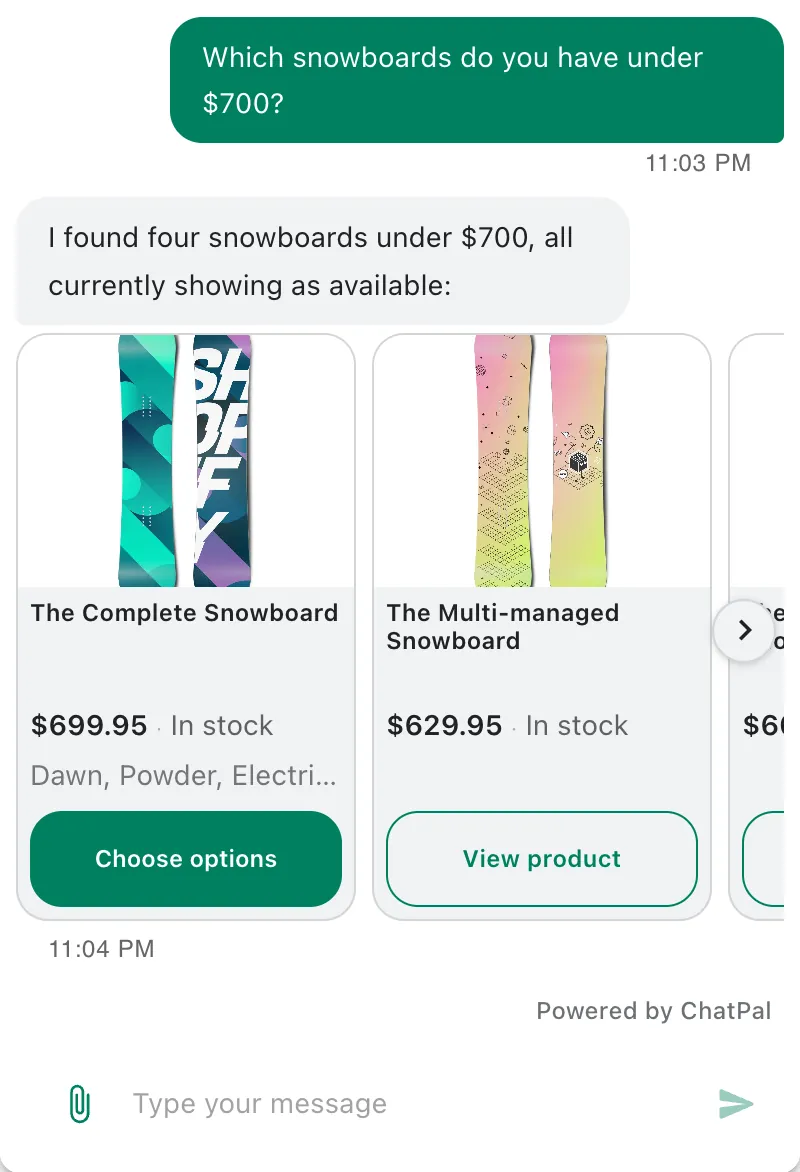
An assistant on your own site and messaging apps talks to people who already chose to visit or message you. It answers in your voice, from your catalog, and hands over to your team when needed. Shopify Inbox's free AI agent does this in your store's chat window. ChatPal does it there and on WhatsApp, Instagram, Messenger and Telegram:
- it answers from a copy of your Shopify catalog that stays in sync within minutes, with prices for the customer's country;
- it tells a signed-in customer where their order is, with tracking and estimated delivery, and passes cancel or delivery-change requests to you;
- in your storefront chat it can add products to the cart and show what's in it.
Free covers 100 replies a month; $20 a month buys 500 (pricing).
A five-item checklist
- Open Sales channels, then Agentic. See which AI channels have your catalog, and turn off any you don't want. Shopify says changes can take up to 7 days, and turning ChatGPT off doesn't stop it from finding your pages by crawling the web.
- Fix your product data. Every product you want found needs a clear title, an image, a price above zero and a published product URL. Set anything you don't want in AI channels to Unlisted, knowing it also leaves search engines. If titles or categories live in metafields, look at Catalog Mapping.
- Complete your policies. Fill in terms of service, privacy, and returns and refunds under Settings, then Policies. AI agents read them, and Copilot's direct checkout requires them.
- Move to new customer accounts if you want any assistant to answer order questions safely. Shopify Inbox's agent and ChatPal's Order support both need them.
- Test the assistant customers meet on your own site. Ask it your ten most common questions, including one about something that sold out, and fix what it gets wrong. Then check your orders for AI channel attribution once a month.
For how the protocols behind all this fit together, read agentic commerce for small stores.
Item 5 is the one you can act on today. If you don't have an assistant on your own site yet, connect your store to ChatPal on the free plan and ask it those ten questions; the Shopify AI shopping assistant guide walks through the setup, and ChatPal's Shopify page shows what it does.