
Shopify Inbox alternatives: when the free chat is enough, and when to switch
Yevhen Kurapov, co-founder · Updated Oct 13, 2026
Shopify Inbox is free; its AI agent answers product, price and signed-in order questions, but only in your store's chat, under a Shopify AI notice that can't be removed. If customers write on WhatsApp, Instagram or Messenger, ChatPal answers there from your catalog: free for 100 replies a month, $20 for 500. Zipchat, Tidio and Gorgias add email.
We make ChatPal, one of the tools below, and list its limits on the same terms as everyone else's.
If your shoppers only ever write in the storefront chat, Inbox is a sensible default: it's Shopify's own app, it costs nothing, and you can test its AI agent on your own questions before you spend a cent elsewhere. The reasons to look further are specific: customers who write on WhatsApp, Instagram or Messenger, a chat that should carry your brand rather than Shopify's AI notice, or a team that answers messages from several places.
What Shopify Inbox does now
Inbox began as a free live chat app. It now has an AI agent you can switch on, and Shopify's help center describes what it does:
- answers questions about product details, availability and price, using your catalog, policies, pages and the knowledge you give it;
- recommends products, using sizes or purchase history when it has them;
- checks order status, but only after the customer signs in;
- adds recommended products to the cart;
- replies in the language the customer writes in.
When a customer asks for a person, the conversation moves to your staff with the AI's context. If nobody is available, the agent gives the customer your store's email address instead. Your team replies from the Inbox desktop app or the iOS and Android apps.
The limits matter as much as the features:
- Your store's chat only. Shopify says the agent "only operates within your online store's chat widget". Inbox's overview talks about customers who visit your online store and doesn't mention Messenger or Instagram.
- A notice you can't change. Customers see that the chat is powered by Shopify and that they're talking to AI. Shopify says it can't be removed or customized.
- Plan and account requirements. The agent needs Shopify's new customer accounts, not the legacy ones, and a Basic, Grow, Advanced or Plus plan.
- You own the answers. Shopify says merchants are responsible for the accuracy of what the agent says, so keep your product pages and policies current.
When Inbox is enough
Stay on Inbox if all of these are true:
- almost every customer question arrives in your store's chat window, not in WhatsApp or Instagram;
- the Shopify AI notice doesn't bother you;
- one or two people answer chats, from the Inbox app;
- you're on new customer accounts, so the agent can check orders.
If that sounds like your store, it costs nothing to find out. Turn the agent on, ask it your ten most common questions, and look at what it gets wrong before you shop around.
It stops being enough in a few recognisable situations:
- Customers message you on social apps. A store that sells through Instagram posts gets its questions in Instagram DMs, and in many countries shoppers simply message on WhatsApp. Inbox's agent doesn't answer there.
- The chat has to look like your brand. Some stores don't want a Shopify AI notice in their chat, and Inbox gives no way to change it.
- Several people answer messages from several places. Inbox covers your store's chat. If your team also answers Instagram, WhatsApp or email, you want those conversations in one place.
- You want the AI to act on orders. Inbox's agent checks order status. Tools such as Gorgias, Tidio and Zipchat can also cancel, refund or edit orders on rules you set.
How we chose
We read each tool's pricing page, help center and, where there is one, its Shopify App Store listing on October 13, 2026. For each, we noted where its AI answers, whether it can look up orders and add to the cart, and what you pay. We make ChatPal, so weigh our view of it accordingly; we didn't test the other tools hands-on.
The tools are grouped by the situation they suit, not ranked.
Shopify Inbox and six alternatives
| Tool | Best for | Price |
|---|---|---|
| Shopify Inbox | Stay: free, in your store's chat | Free app |
| ChatPal | Your catalog in messaging apps | Free for 100 replies a month; $20 for 500, $50 for 1,500 and $120 for 4,000, billed monthly |
| Zipchat | AI sales chat that also answers email | Free for 120 AI replies a month; Starter $80 a month billed monthly, or $64 billed yearly, for 750 AI replies |
| Tidio | Live chat with a separate AI package | Free plan; Starter $29 a month; Lyro AI from $39 a month for 50 AI conversations, billed monthly |
| Gorgias | A helpdesk for a support team | Starter $10 a month for 50 tickets, billed monthly; AI Agent is a usage add-on at $1.00 per interaction on monthly plans |
| Re:amaze | A helpdesk priced per team member | Basic $29 per team member a month billed monthly, $26.10 billed yearly |
| Crisp | One price for the whole team | Free plan without AI; Mini $45 and Essentials $95 a month per workspace |
Stay: free, in your store's chat
Shopify Inbox
Price: Free app
Good at
- Its AI agent answers product, stock and price questions from your catalog, policies and pages, and adds products to the cart
- Checks order status once the customer signs in, and replies in the language the customer writes in
- Your team replies from the desktop app or the iOS and Android apps
Keep in mind
- The AI agent works only in your online store's chat widget
- Customers see a notice that the chat is powered by Shopify and that they're talking to AI; it can't be removed or customized
- Needs new customer accounts and a Basic, Grow, Advanced or Plus plan
Your catalog in messaging apps
ChatPal
Price: Free for 100 replies a month; $20 for 500, $50 for 1,500 and $120 for 4,000, billed monthly
Good at
- Answers in your website chat, WhatsApp, Instagram, Messenger and Telegram on every plan, the free one included
- Answers from a copy of your Shopify catalog that stays in sync within minutes, with prices for the customer's country
- Tells a signed-in customer where their order is, on the website, WhatsApp, Instagram and Telegram
- Handed-off website, WhatsApp, Instagram and Telegram chats share one inbox
Keep in mind
- Add to cart works in your storefront chat only, not in messaging apps
- No email channel: it answers chats and messages, not your support mailbox
AI sales chat that also answers email
Zipchat
Price: Free for 120 AI replies a month; Starter $80 a month billed monthly, or $64 billed yearly, for 750 AI replies
Good at
- Website chat, email, WhatsApp, Instagram and Messenger on every plan, the free one included
- Finds an order by the customer's email, phone or order number, and can cancel or refund within your rules once you connect that skill
Keep in mind
- Every AI reply on every channel comes out of one monthly allowance; extra packs are $49 for 250 replies
- Starter's 750 replies are about 300 conversations, by Zipchat's own estimate
Live chat with a separate AI package
Tidio
Price: Free plan; Starter $29 a month; Lyro AI from $39 a month for 50 AI conversations, billed monthly
Good at
- Messenger, Instagram, WhatsApp and email on every plan, the free one included
- Lyro handles order status, refunds and order edits in Shopify, on rules you set
Keep in mind
- Lyro is its own package, billed per AI conversation on top of any live chat plan
- The free plan's 50 Lyro conversations come once, not every month
- Removing Tidio branding is a Growth add-on, $20 a month
A helpdesk for a support team
Gorgias
Price: Starter $10 a month for 50 tickets, billed monthly; AI Agent is a usage add-on at $1.00 per interaction on monthly plans
Good at
- AI Agent answers on email, chat, SMS, Instagram DMs, Messenger and WhatsApp
- From Basic, AI Agent can cancel orders, process returns and update addresses, if switched on
Keep in mind
- No free plan; free trial without payment details
- Each interaction also counts as a ticket. Gorgias's FAQ lists $1.00 per interaction on monthly plans; its pricing page data lists $1.50 above the plan's allowance
A helpdesk priced per team member
Re:amaze
Price: Basic $29 per team member a month billed monthly, $26.10 billed yearly
Good at
- Its AI agent answers from your help center and from Shopify products and orders
- 14-day trial with every Plus feature, no card required
Keep in mind
- AI agent resolutions: 5 per team member a month on Basic, then $0.85 each
- Its help center lists chat, email and SMS for the AI agent; WhatsApp and Instagram aren't on that list
One price for the whole team
Crisp
Price: Free plan without AI; Mini $45 and Essentials $95 a month per workspace
Good at
- Its AI agent can fetch a Shopify customer's order with its status, items and delivery details
- Priced per workspace with agents included: 4 on Mini, 10 on Essentials
Keep in mind
- WhatsApp Business and Instagram DMs start on Essentials, $95 a month
- Removing the “We run on Crisp” watermark needs Plus, $295 a month
Side by side
| Tool | Where the AI answers | Orders in chat | Starts at |
|---|---|---|---|
| Shopify Inbox | Your store's chat | Status, after sign-in | Free |
| ChatPal | Website, WhatsApp, Instagram, Messenger, Telegram, Zendesk | Status and tracking, after sign-in (not in Zendesk) | Free for 100 replies; $20 for 500 |
| Zipchat | Website, email, WhatsApp, Instagram, Messenger | By email, phone or order number; refunds and cancellations with skills | Free for 120 AI replies; $80 for 750 |
| Tidio | Website, email, Messenger, Instagram, WhatsApp | Status, refunds and edits on your rules | Free plan; Lyro from $39 |
| Gorgias | Email, chat, SMS, Instagram, Messenger, WhatsApp | Cancellations, returns, address changes if switched on (from Basic) | $40 with AI Agent, for 50 tickets |
| Re:amaze | Chat, email; SMS from Pro | Shopify orders | $29 per team member |
| Crisp | Website; WhatsApp and Instagram from $95 | Order status, items and delivery | Free without AI; $45 |
Prices are in US dollars a month. "Starts at" is the lowest plan with AI unless stated.
Two things the table leaves out. Add to cart: Inbox, ChatPal, Tidio and Gorgias document it; ChatPal only in your storefront chat, not in messaging apps. Zipchat shows an add-to-cart button in its demos. Branding: Inbox's notice is fixed. Tidio's badge comes off for $20 a month on Growth, and Crisp's watermark only on Plus at $295. ChatPal's chat window takes your own colours, font and title.
What the same month costs
The tools count different things, so here is one store on one month: 100 customer conversations the AI should handle. Where a tool counts replies, we assumed three AI replies per conversation, so 300 replies. That's our assumption, not a measured average; count a week of your own chats and use your number.
- Shopify Inbox: free, in your store's chat only.
- ChatPal: $20 a month. The Starter plan's 500 replies cover 300 with room to spare; Free's 100 replies wouldn't.
- Zipchat: $80 a month billed monthly, or $64 billed yearly, for Starter's 750 AI replies. The free plan's 120 replies cover about 40 conversations at our assumption.
- Tidio: Lyro's 100-conversation step is $75 a month billed monthly. The free live chat plan covers 50 conversations a month for the chats Lyro hands to your team.
- Gorgias: each AI interaction also counts as a ticket, so 100 of them pass Starter's 50 tickets: Starter with AI Agent ($40) plus overage is about $130 to $165, Basic with AI Agent ($90) about $160 to $195, depending on whether the $1.00 in Gorgias's FAQ or the $1.50 in its pricing page data applies past the allowance.
- Re:amaze: one team member on Basic is $29 a month with 5 AI resolutions included; if all 100 conversations count as resolutions, the other 95 add $80.75.
- Crisp: Mini, at $45 a month, includes AI credits for around 90 automated conversations, just short. Essentials, at $95, covers around 450 and adds WhatsApp and Instagram.
Of the prices shown, Inbox and ChatPal cost least, and only ChatPal of the two answers on messaging apps. At this volume Zipchat, Tidio and the helpdesks cost more; the helpdesks are built for a support team that also handles email.
Inbox or ChatPal
If your customers only ever write in your store's chat and the Shopify AI notice doesn't bother you, keep Inbox. Nothing on this page beats free for that job.
Choose ChatPal if:
- your customers write on WhatsApp, Instagram, Messenger or Telegram, and you want the same assistant there, answering from your catalog with product cards;
- you sell in several countries and want each customer quoted the price of their own market;
- you want hand-offs from web, WhatsApp, Instagram and Telegram in one inbox, with alerts.
ChatPal counts the replies its assistant writes, not conversations, so count the replies in a week of your own chats before you pick a plan.
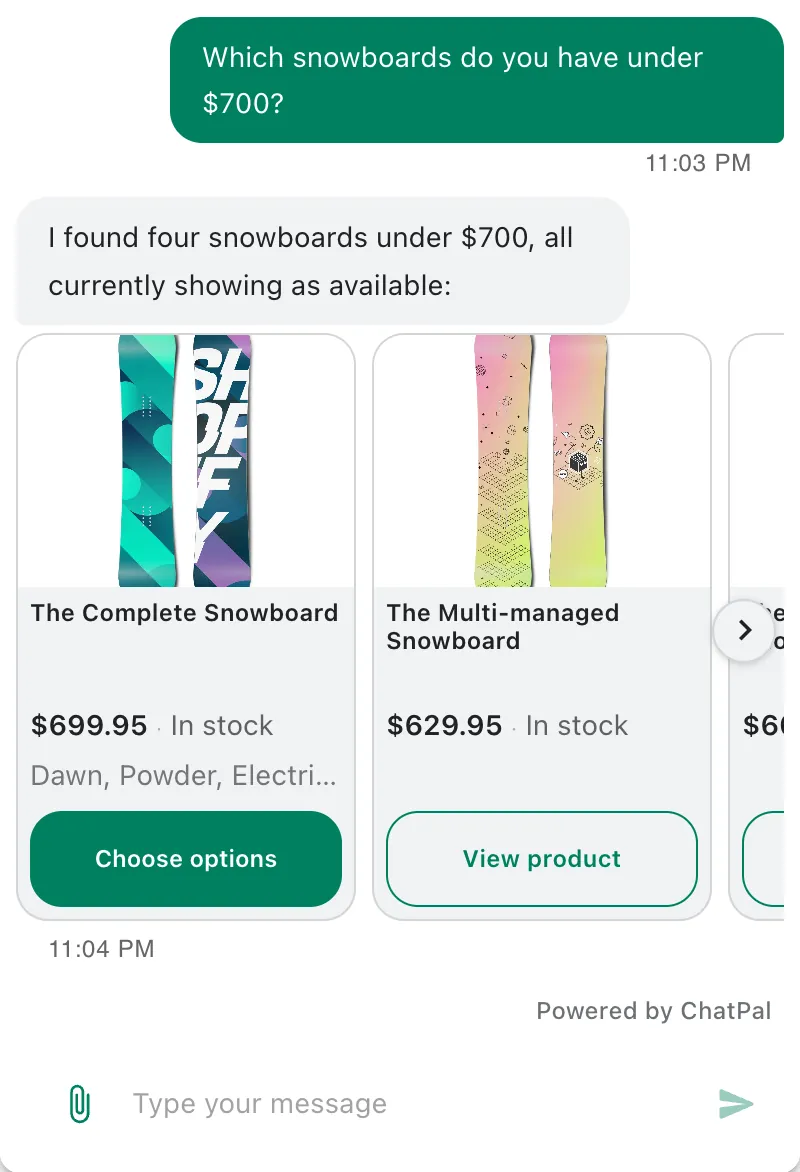
Switching, or running both
You don't have to replace Inbox to add messaging apps. ChatPal answers product questions from your Shopify catalog on every channel once the store is connected, and the storefront chat widget is a separate step you can skip. So one setup is: Inbox stays in your storefront chat, and ChatPal answers WhatsApp, Instagram and Telegram. The downside is that your team works from two inboxes.
If you'd rather have one assistant everywhere:
- Connect the store. In ChatPal, go to Integrations, then Shopify, enter your store's Shopify address and click Connect Shopify. Shopify asks for read-only permissions; ChatPal never changes your products, orders or settings. Setup then reads your store's pages and drafts a welcome message and instructions for you to review.
- Test before customers see it. Ask your most common questions in the Playground, including one about something that sold out yesterday. Its replies count toward your monthly messages.
- Add your channels. Each one has its own tile under Integrations.
- Turn on Order support on the Shopify page in ChatPal if you want order answers. It needs new customer accounts, like Inbox's agent does.
- Swap the storefront chat. Shopify turns Inbox's chat on in the theme editor, so turn it off there. Then, in your Shopify admin, go to Online Store, click Edit theme (or Customize), open App embeds, toggle on ChatPal Chat Widget and save. Showing one chat button avoids confusing customers.
Past Inbox conversations stay in Shopify Inbox; ChatPal doesn't import them.
For the full setup, see how to set up an AI shopping assistant on Shopify and ChatPal's Shopify page. For more Shopify tools, read the best AI chatbots for Shopify stores. If Zipchat is on your shortlist, our Zipchat alternatives comparison goes into its pricing.