
Instagram DM automation for online stores: answer the question, not just the keyword
Yevhen Kurapov, co-founder · Updated Oct 13, 2026
Instagram's inbox automations and tools like ManyChat send prewritten replies to keywords and comments. An AI assistant such as ChatPal answers the DM itself, from your catalog and policies, with product cards. Meta lets a business DM only people who messaged it or commented, with 24 hours to reply. Turn off Instagram's instant replies first: they pause the assistant.
Most DMs to an online store are product questions: is it in stock, what size, how much to ship, where's my order. The answers already sit in your catalog, size chart and shipping page; the work is getting them into the DM quickly without someone typing each one. There are two ways to automate that: replies you write in advance and fire on a keyword or a comment, or an AI assistant that reads each question and answers it from your content.
Meta's rules don't change with the tool: you can DM only people who wrote to you or commented on your post, and you have 24 hours to reply. Below: which approach suits which job, how to set up an AI assistant on a store's DMs, and what happens when you step in yourself. We make ChatPal, so the setup steps are ours (the Instagram assistant).
What store DMs ask
Scroll back through a week of DMs and most of them will look like one of these:
- Product and stock. "Is the linen shirt from your last post still available in M?" "Do you have this in green?"
- Price. "How much is this?" under a post or story that doesn't show the price.
- Size and fit. "I'm usually a 38, which size should I take?"
- Shipping and returns. "Do you ship to Canada and how long does it take?" "Can I return it if it doesn't fit?"
- Order status. "I ordered on Monday, when will it arrive?"
- Something only you can answer. A complaint, a wholesale enquiry, a collab request.
The first five are already answered somewhere in your store: the catalog, the size chart, the shipping and returns pages, the order itself. The last one needs you.
Keyword triggers vs AI answers
Stores use three kinds of tools for this, and they aren't interchangeable.
| Meta Business Suite automations | Flow builders (ManyChat) | AI assistant (ChatPal) | |
|---|---|---|---|
| What starts it | First message, a keyword, an FAQ the person taps, a comment with a hashtag | A keyword, a comment, a story reply, a new follower | Any DM |
| What it sends | A message you wrote in advance | A flow you built: messages, buttons, links | An answer written for that question from your content |
| "Is this in M?" | A preset message, if a keyword matches exactly | A flow's reply, or AI Replies on Pro | Checks the size in your catalog and sends the product |
| Comments | Comment to message, on desktop | Comment-to-DM | Not supported |
| Cost | Free | Free for 25 contacts a month; AI replies from Pro, $39 a month | Free for 100 replies a month; from $20 a month |
Meta Business Suite's Inbox automations are free and built in: an instant reply to someone's first message, an away message, FAQs people can tap, and replies for location, contact details and hours. Custom keyword replies only fire when the keyword matches exactly (they're case-sensitive), are set up on desktop, and go out after 15 minutes unless you've replied first.
ManyChat is made for growth campaigns: "comment SIZE and we'll DM you the chart", follow-to-DM, story-reply flows and collecting emails in DMs. Its free plan includes comment-to-DM with up to four live automations. Its AI, which answers FAQs from business knowledge you save, is in beta and starts on the Pro plan (costs below). We compare its plans in detail in ManyChat pricing explained.
An AI assistant answers whatever the DM says. ChatPal answers from your catalog when a Shopify or Horoshop store is connected, and from your pages and files for everything else. It doesn't reply to comments.
Running a comment tool and an AI assistant on the same account is possible, but test it before you rely on it. ChatPal steps back from a chat whenever a reply goes out from Instagram or Business Suite, automated ones included, and a DM sent by another tool may have the same effect. We'd let one tool answer DMs.
Meta's rules you can't break
Every tool on Meta's messaging API lives by these:
- The customer writes first. A business can only DM someone on Instagram after they message it or comment on its post. No cold DMs, and no "we miss you" messages to old customers.
- 24 hours to reply. Meta gives a business 24 hours to respond to a message. After that, Meta's policy allows only a manual reply by a person, within 7 days, using a Human Agent tag. Answer handed-over chats the same day.
- Say it's automated where required. Meta's policy says automated chats must disclose that they're automated when the law requires it, and recommends it as good practice everywhere.
Setting it up
You need an Instagram Business or Creator account (not a personal one) connected to a Facebook Page, and the login for that account. If you're still on a personal account, Instagram explains how to switch.
1. Sign up and connect your store. Sign up at chatpalbot.com with your email or Google. On first sign-in, paste your store's address and click Let's get started: ChatPal reads the site and drafts the assistant's instructions, and if the site runs on Shopify or Horoshop it offers to connect the store right there. A Shopify store is synced within minutes of any change; Horoshop is refreshed once a day from your product export.
2. Add what the catalog doesn't say. In Configuration, upload your size chart, shipping rates and returns policy on the Files tab with Upload files, or add the pages on the Links tab with Add Link. Shoppers ask about delivery and returns about as often as about products.
3. Turn off Instagram's own automations. If you use instant replies or FAQs in Meta Business Suite or the Instagram app, switch them off. ChatPal treats any reply sent from Instagram or Business Suite, automated ones included, as your team stepping in, and pauses the assistant on that chat.
4. Connect Instagram. In ChatPal, open Integrations → Instagram and click Connect Instagram.
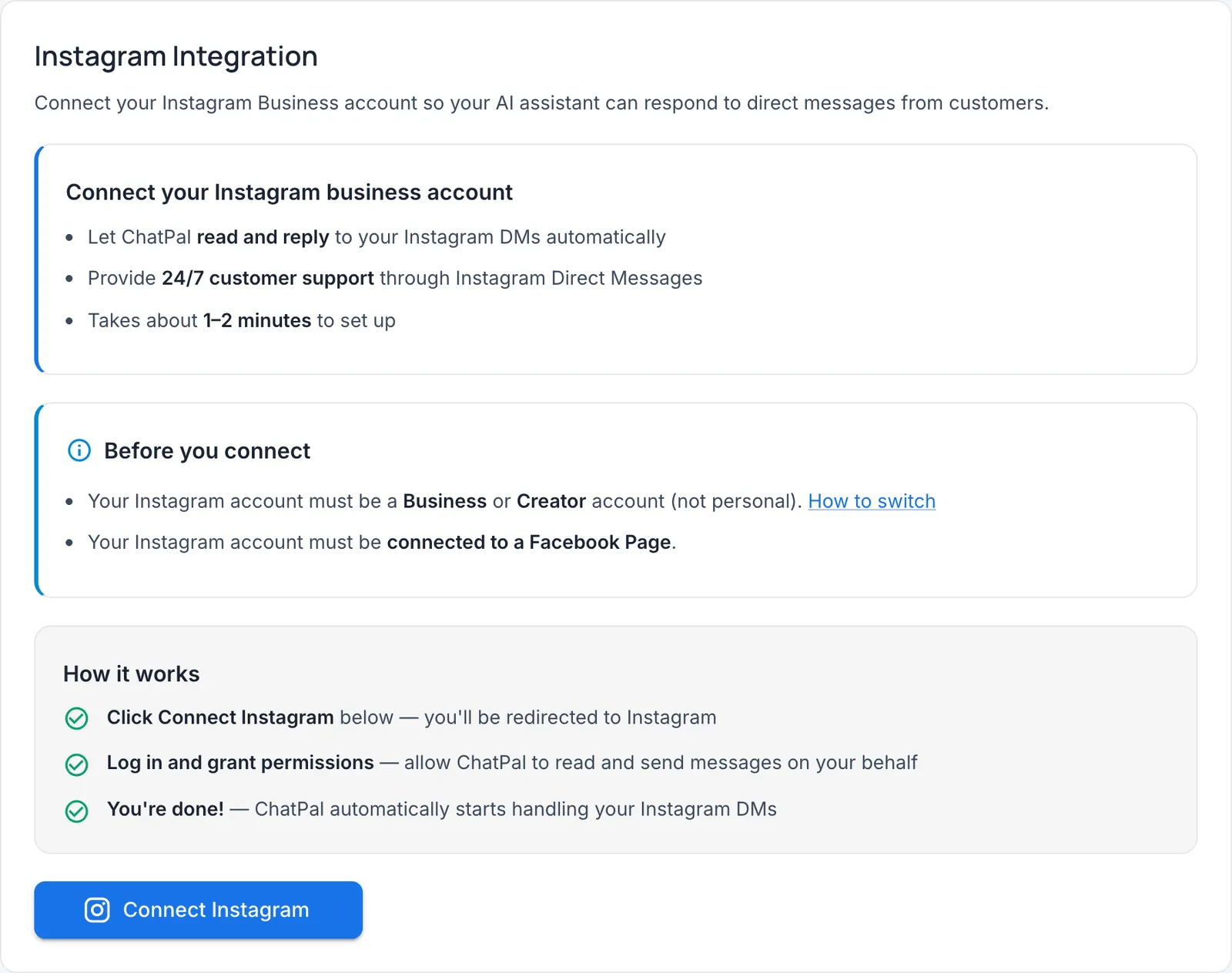
Log in to the store's Instagram account and allow the permissions Instagram asks for, which let ChatPal read and reply to your DMs. You're taken back to ChatPal with "Instagram account connected successfully" and the account shows as Active. The assistant starts answering straight away, so do steps 1 and 2 first. On a phone, if Instagram opens its app and shows an error, tap Copy auth link and finish in your browser.
5. Test it. Send a DM from a different Instagram account: a stock question, a size question, "where's my order?". Then try the same and harder ones in the Playground in the left navigation, and fix the file or instructions when an answer is off. Test replies count toward your monthly messages.
The connected page also gives you an ig.me link to your DMs and a Download QR code button. The QR image works on a story, a flyer or a packing slip.
Product cards in DMs
When a shopper asks for products, ChatPal sends them on Instagram as one swipeable carousel, up to five products at a time, and the whole card is tappable. Each card is a snapshot of what your store says about the product at that moment. With Shopify, prices follow the shopper's country, and a discounted product carries its previous price in the card text, such as "$60.98 (was $101.30)". The assistant only calls something a sale when your store marks it as discounted.
On a Shopify store, follow-ups work the way people talk: "the second one", "is that one in black?", "anything cheaper?". The assistant remembers what it has already shown in that chat.
Two things a DM can't do. Adding to the cart works only in the chat widget on your Shopify storefront, so on Instagram the card takes the shopper to the product page to buy. And for order questions on a Shopify store, the assistant sends a sign-in link when Order support is on: once the customer signs in to your store, it answers about their own orders only, such as where an order is, its tracking and estimated delivery. A request to cancel or change delivery is passed to your team.
When a person takes over
A chat reaches a person in one of three ways:
- The customer asks for one. Turn on Enable human-in-the-loop on the Settings tab in Configuration. When a customer asks for a person, the assistant stops in that chat, your team is alerted by email or Telegram, and the chat waits in Chats under Handed off to a human. Your reply from ChatPal arrives in their Instagram DMs.
- A topic you always want to see. On the same tab, add a category under Categories for wholesale, complaints or press, choose Human escalation, and matching messages are handed to you.
- You reply from Instagram. Answer a customer from the Instagram app or the Meta Business Suite inbox and the assistant steps back from that conversation. In Chats it's marked Operator in Instagram. The assistant returns after a quiet period you set (24 hours by default) or when you click Return to AI.
What it costs
ChatPal counts replies; every channel is on every plan, the free one included. Prices checked on October 13, 2026, billed monthly (pricing): Free for 100 replies a month, Starter $20 for 500, Standard $50 for 1,500 and Pro $120 for 4,000. Each reply the assistant writes counts, including replies to your own tests. New accounts get a one-time welcome bonus of extra messages in their first month.
ManyChat counts people instead: everyone you interact with in a month is one active contact, however many messages they send. Pro, the first plan with AI replies, is $39 a month billed monthly ($29 billed yearly) for 2,500 of them, and each extra contact on monthly Pro costs $0.05.
An illustration, on our own assumptions: a store that gets 300 product DMs a month, with the assistant writing three replies per conversation, uses about 900 ChatPal replies, which fits Standard at $50. The same 300 people are well inside ManyChat Pro's 2,500 contacts at $39. When each person sends a lot of messages, ManyChat's per-person pricing tends to cost less. At lower volumes, ChatPal's free and $20 plans give you AI answers that start at $39 on ManyChat, and every ChatPal plan includes all its channels, where ManyChat Pro connects three. Count a week of your own DMs before you decide; that number settles it faster than any table.
Limits worth knowing
- Voice messages and videos get no reply. Photos are read, up to four per message.
- Stories: a reply to your story is answered like any DM, but the assistant doesn't see which story it was. Story mentions aren't answered.
- No comments and no first messages. It answers DMs people send you.
- Access renewal. ChatPal refreshes Instagram's access automatically. If the assistant ever stops replying, click Disconnect, then Connect Instagram, and log in again.
The quickest way to judge it on your own DMs: connect the store, connect Instagram on the free plan, and send it the five questions you answered most last week. If the answers hold up, leave it on.
If you run a salon or studio rather than a store, our Instagram DM guide for salons covers booking from DMs. And if your customers also write on WhatsApp, see WhatsApp auto-replies and when to add AI.