
AI product recommendations on Shopify that only suggest what you sell
Yevhen Kurapov, co-founder · Updated Oct 13, 2026
Shopify's own recommendations put related and complementary products on the product page. A shopping assistant answers “something for…” questions in chat instead. ChatPal searches its synced copy of your catalog, filters by budget, collection, sale and stock in the shopper's country, and shows product cards. It never suggests products you don't carry, and it isn't a personalised recommendation engine.
Product recommendations on Shopify come in two forms. A widget on the product page shows related or complementary items, picked from purchase data or set by you. A shopping assistant answers a question instead: "a gift for a coffee lover under $40", "what's your quietest grinder?". The second kind is only worth having if it never suggests something you don't sell, at a price you don't charge. Below: how the two differ, why a chatbot can get this wrong, and how ChatPal (we make it) answers from your own catalog, including the things it won't do.
Two kinds of recommendations
Shopify's Search & Discovery app gives you the widget kind. Related products are similar items, possible substitutes. Complementary products are things often bought in addition, such as filters with a coffee maker. Shopify generates related recommendations from purchase history, from product descriptions on English storefronts, or from related collections, and you can set up to 10 of each per product by hand. Complementary products appear as a block on the product page if your theme supports it.
A conversation works the other way round. The shopper describes what they need, and the assistant searches for it.
| Recommendation widget | Shopping assistant | |
|---|---|---|
| Starts from | The product being viewed | The shopper's question |
| Uses | Purchase history, descriptions, your picks | Their words: budget, purpose, preferences |
| Shows | A row of products | A few products that match the request |
| Where | Product page, cart | Website chat, Instagram, WhatsApp, Messenger, Telegram |
| Best at | Add-ons and alternatives to a chosen product | "I don't know what I want yet" |
Most stores end up with both. The widget helps shoppers who already found a product. The assistant helps the ones who haven't.
Why a chatbot can recommend products you don't sell
Here is the failure you want to avoid. A shopper asks for a burr grinder under $100, and the bot suggests a model you've never stocked, at a price it found somewhere else. There are usually three causes:
- The bot answers from its general knowledge. A language model has read about thousands of products. Without a hard rule to answer only from your catalog, it fills gaps from memory.
- It learned your products from crawled pages. A copy of your product pages from last month still lists the grinder you discontinued and the price before your increase.
- It treats a near-miss as a match. Asked for something waterproof under $50, it shows a $45 jacket that isn't waterproof, because that was the closest search result.
A catalog-grounded assistant is built against each of these. Products come only from your store's data, that data refreshes on its own, and every result is checked against the whole request before it's shown.
How a catalog-grounded assistant answers "something for…"
When you connect a Shopify store, ChatPal keeps its own read-only copy of your catalog: products, variants, descriptions in every language you publish, collections, prices for each market, and stock. A change in Shopify usually reaches it within minutes. When a shopper asks for a recommendation, the assistant:
- Searches the copy by words and by meaning, so "something to keep coffee hot" can find a thermal carafe whose title never says "hot".
- Applies what the shopper asked for: a budget, "only in stock", a collection such as your sale shelf, cheapest or most expensive first. Prices and budgets use the shopper's own country and currency, and a product you don't sell in their country is left out.
- Checks the result against every requirement. If nothing fits all of them, it says which one fails and asks which to relax.
- Shows up to five product cards with photo, current price and stock.
- Keeps track of what it showed, so "tell me about the second one" or "which of those two is cheaper?" works without repeating the search.
It never invents a product, a spec or a discount. It calls something a sale only when your store sends the price it was before, the Compare-at price in Shopify, and then it states both prices.
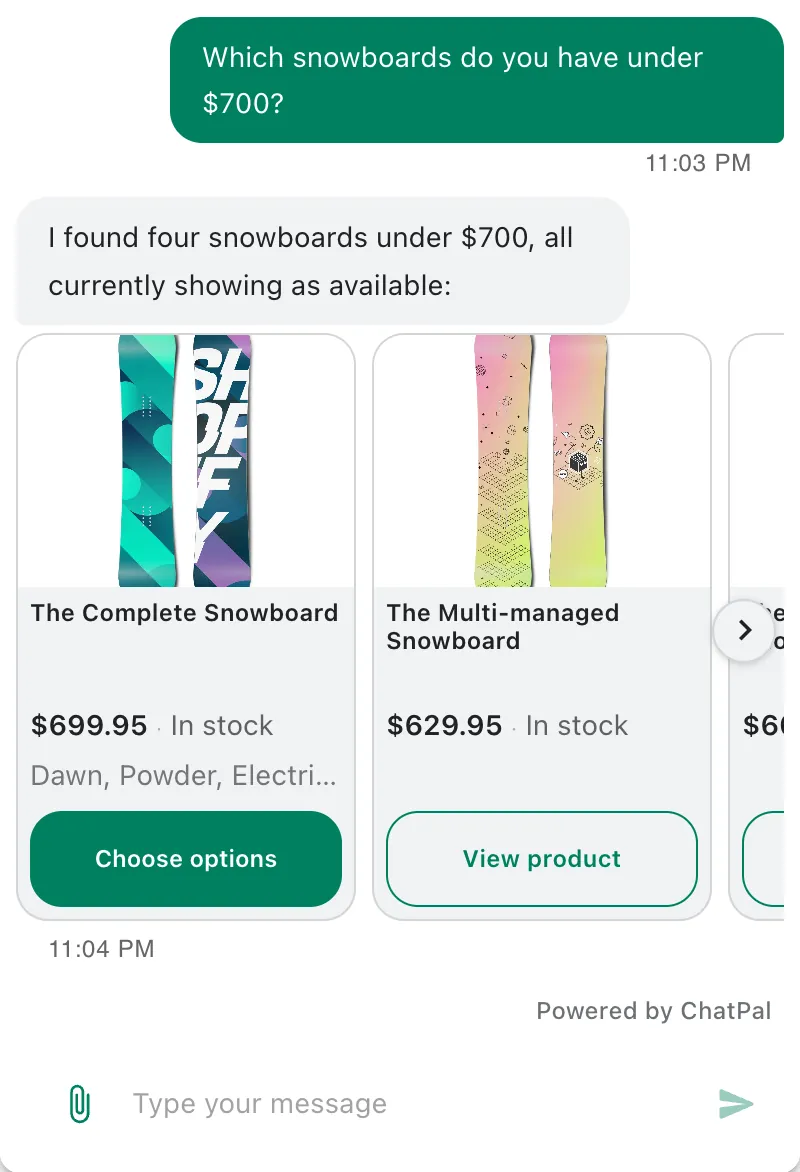
Example questions it handles
| The shopper asks | What the assistant does |
|---|---|
| "A gift for a coffee lover under $40" | Searches by meaning, keeps products under $40 in the shopper's currency |
| "What's your cheapest grinder?" | Sorts matching products by price. With more than 100 matches, it picks the cheapest among the closest matches |
| "Anything on sale?" | Lists products with a previous price, or your sale collection |
| "Show me the new arrivals" | Lists up to 10 products from that collection, in your order |
| "What's new?" | Shows your most recently published products |
| "What's popular?" | Ranks by sales when your store has that data; otherwise says so and offers newest or price order |
| "Under 50 euros" from a US shopper | Converts the budget at the latest rate and says "about" |
| "Do you have ABC-123?" | Finds the product by its SKU |
| A photo and "do you have something like this?" | Reads the photo (up to four per message) and looks for it in your catalog |
| "Is the black one available in 12 oz?" | Checks that variant's stock again before answering |
Setting it up
Recommendations are only as good as your product data, so most of the setup happens in Shopify, not in ChatPal:
- Connect the store. In ChatPal, go to Integrations, then Shopify, type your
.myshopify.comaddress in Store address and click Connect Shopify. The Shopify setup guide covers every screen, including turning on the chat widget in your theme. - Write descriptions that say what a product is for. "Double-walled, keeps coffee hot for 6 hours, holds 34 oz" gives the search something to match. A description that only says "Our bestseller!" doesn't.
- Build collections for the questions you get. "Gifts under $50", "New arrivals", "Sale". The assistant reads your collection names and lists what's in them, in any language the shopper writes in.
- Use Compare-at price for real discounts. That's how the assistant knows a sale is a sale. A collection named "SALE" isn't proof on its own, and a product discounted on only some variants is treated as not discounted.
- Tell it how to recommend. In ChatPal, open Configuration, and on the Basic tab use the Instructions field: "When someone asks for a gift, ask who it's for and their budget before suggesting. Suggest two or three products, not more. If they choose a brewer, ask whether they need filters."
- Test in the Playground. Ask ten real recommendation questions, including one for something you don't sell. Click Why this answer? under a reply to see which products it drew on and what it searched for.
On your storefront the shopper can ask the assistant to add a product to their cart once the variant is settled. On Instagram, WhatsApp, Messenger and Telegram the same recommendations arrive as cards with links to the product.
What it doesn't do
- No personalised recommendation engine. It doesn't learn from a shopper's browsing or past orders, and it doesn't do "frequently bought together".
- No automatic upsell or bundles. Only what your instructions ask for.
- No store-wide filters by attribute. It can check a size or color on a product it found, but "everything you have in size 10" isn't a filter it runs across the catalog.
- No paging. There's no "show me more results"; a follow-up search shows different products. A collection shows up to 10.
- In stock or not, not how many. It doesn't give exact stock counts.
- "Most popular" needs sales data. Without it, the assistant says it has no popularity ranking.
To compare Shopify chatbots side by side, see our comparison of AI chatbots for Shopify stores. For the support side of the same assistant, read the customer service chatbot guide for online stores.
Every reply counts toward your monthly messages, your Playground tests and Copilot's replies included: 100 on Free, 500 on Starter at $20 a month, 1,500 on Standard at $50 a month (plans). The free plan is enough to connect your store and find out whether it recommends your products the way you would. Ask it for something you don't sell first.