
Chatbot script examples: the short instructions that replaced the decision tree
Yevhen Kurapov, co-founder · Updated Oct 19, 2026
An AI chatbot doesn't need a script of every message. It runs on about ten lines of instructions (its role, what it must not say, when to ask for a contact) plus your own pages and price lists, and writes each reply from them. Below: before-and-after conversations and copy-ready instructions for a store, salon, dental clinic and real-estate agency.
A chatbot script used to mean every message a bot could send, drawn as a decision tree: a greeting, three buttons and a fixed reply behind each. An AI assistant doesn't work from one. You give it your own pages and price lists, add about ten lines of instructions on how to behave, and it writes each reply itself. So the script you write today is those ten lines.
Below: three conversations showing what one line of instructions changes, templates for four trades, and when a fixed script still wins. We make ChatPal, so the conversations follow how a ChatPal assistant behaves; the templates work in any chatbot that takes written instructions.
Script or instructions: what you write
| Decision-tree script | AI instructions plus knowledge | |
|---|---|---|
| What you write | Every message, button and branch | 6 to 12 lines on role, limits and contacts |
| Where the facts live | Inside the script, repeated per branch | In your pages, files or connected store |
| A question nobody planned for | "Sorry, I didn't understand" | An answer from your content, or "I don't have that information" and a next step |
| Same wording every time | Yes | No: the wording varies, the facts and limits don't |
Here is a scripted bot at an example hair salon:
Bot: Hi! How can we help?
[Buttons: Prices, Book, Opening hours]
Client: how much is balayage and do you have anything saturday
Bot: Sorry, I didn't understand. Please choose one of the options below.
The client asked two things at once, in her own words, the way people write in WhatsApp and Instagram DMs. Covering it takes a branch for balayage and another for Saturday, and the next client asks about something else. An assistant with the salon's price list answers both in two sentences, as the screenshot further down shows.
What the assistant does without being told
Long instructions are usually long because they repeat what the platform already does. A ChatPal assistant follows these rules before it reads a line of yours:
- It answers in the language the customer writes in.
- It keeps replies to one or two short sentences and asks one question at a time, unless the customer wants more.
- It takes prices, policies and stock only from your own content (pages, files, a connected store), and says it doesn't have the information instead of guessing.
- It declines requests that have nothing to do with your business, such as homework or code.
- With lead capture on (the default, collecting name and phone number), it asks for contact details once, never in its first reply, and only when your team can help further.
So skip "keep it short" and "reply in the customer's language". Spend your lines on what only you know: what the assistant must not say, the order of questions in your trade, and when a contact is worth asking for. On scope and contacts, your rules win over these defaults.
What one line of instructions changes
Each question below is asked twice: first with only the business's own pages behind the assistant, then with one line added to its instructions. These are example conversations we wrote for this page; the businesses are fictional and the prices made up.
A dental clinic: no advice on symptoms
Out of the box, an assistant may explain widely known facts about its subject, which for a clinic means symptoms:
Patient: My gums bleed when I brush. Is that serious?
Assistant: Bleeding when you brush is often a sign of gum inflammation from plaque along the gum line. A check-up is the best way to find out what's causing it.
Accurate, and still not what most clinics want an automated chat to say. Add one line:
Don't explain symptoms, diagnose or suggest treatment. Say a dentist needs to see it and offer a check-up.
The same question now gets:
Patient: My gums bleed when I brush. Is that serious?
Assistant: A dentist needs to see your gums to tell what's causing it. A check-up with cleaning is $120 and takes 45 minutes. Would you like to book one?
The price and duration still come from the clinic's price list; the line only changed what the assistant may say about symptoms.
A real-estate agency: find out what they need first
Without guidance, the assistant answers the question as asked, with every listing that fits:
Client: Do you have any 2-bedroom apartments?
Assistant: Yes, three: Maple Street for rent at $2,100 a month, Harbor View for sale at $385,000, and Elm Court for rent at $2,450 a month. Would you like details on any of them?
Add:
Before suggesting listings, ask whether they want to buy or rent, then their budget, one question per message. Suggest only listings that match both.
With that line in place:
Client: Do you have any 2-bedroom apartments?
Assistant: We do. Are you looking to buy or rent?
Client: rent
Assistant: What's your monthly budget?
Client: up to 2300
Assistant: Maple Street fits: a 2-bedroom on the second floor for $2,100 a month. Would you like to arrange a viewing?
One listing that fits instead of three to sort through, and the agent who reads the chat knows the budget before replying.
An online store: when to ask for a contact
The assistant doesn't ask for contact details when it can answer the question itself:
Shopper: Do you ship to Canada?
Assistant: We ship within the US only for now.
A store that wants a waiting list for new countries adds:
When someone asks about shipping to a country we don't ship to, say so and ask for their email so we can tell them if that changes.
Now the reply carries the ask:
Shopper: Do you ship to Canada?
Assistant: We ship within the US only for now. If you leave your email, we'll let you know if we start shipping to Canada.
The assistant collects the details ticked under Contact details to collect on the Handoff & leads tab in Configuration. For this list, tick Email, which is off by default, and untick Name and Phone: the form under the reply in your website chat then asks only for the email, and the address appears in Leads.
None of the three lines holds a price or a policy: those stay in the pages and files the assistant searches.
Copy-ready instruction templates
Each template has the shape of ChatPal's own presets: a role, then behavior rules. Replace everything in [square brackets], delete lines that don't apply, and keep prices, hours and policies in your knowledge base.
In ChatPal, open Configuration, paste the text into the Instructions card on the General tab and click Save. The Preset list above the box offers three ready-made ones (General AI assistant, Customer support assistant and Sales assistant); these templates are the same idea for a specific trade. Picking a preset replaces everything in the box, so don't pick one after pasting your own. The same instructions apply on every channel the assistant is connected to.
Online store
Role
- You are the customer assistant for [store name], an online store selling [what you sell] to customers in [where you ship].
- You help shoppers choose products and answer questions about delivery, returns and orders.
Behavior
- Suggest at most [three] products at a time.
- Don't offer a discount or free shipping, even to an unhappy customer.
- When someone asks about shipping to a country we don't ship to, say so and ask for their email so we can tell them if that changes.
- If an order arrived damaged or wrong, apologize once and ask for a photo of the item and the order number. Don't offer a refund or replacement yourself; our team decides.
Keep in the knowledge base: shipping countries, costs and times, the returns policy and the size guide. With a Shopify or Horoshop store connected, product answers come from its catalog; on any other site, only from the pages and files you add.
Hair or beauty salon
Role
- You are the assistant for [salon name], a [hair and beauty] salon in [neighborhood, city].
- You answer questions about services, prices, opening hours and appointments.
Behavior
- When a price depends on hair length or the stylist, say so and give the range from our price list.
- Don't recommend a treatment from a photo or a description of someone's hair or skin. Suggest [a consultation] instead.
- For a color service for a new client, mention the patch test [48 hours] before the appointment.
- [Without online booking:] When someone wants an appointment, ask for their name and preferred day and time, and say the team will confirm by message.
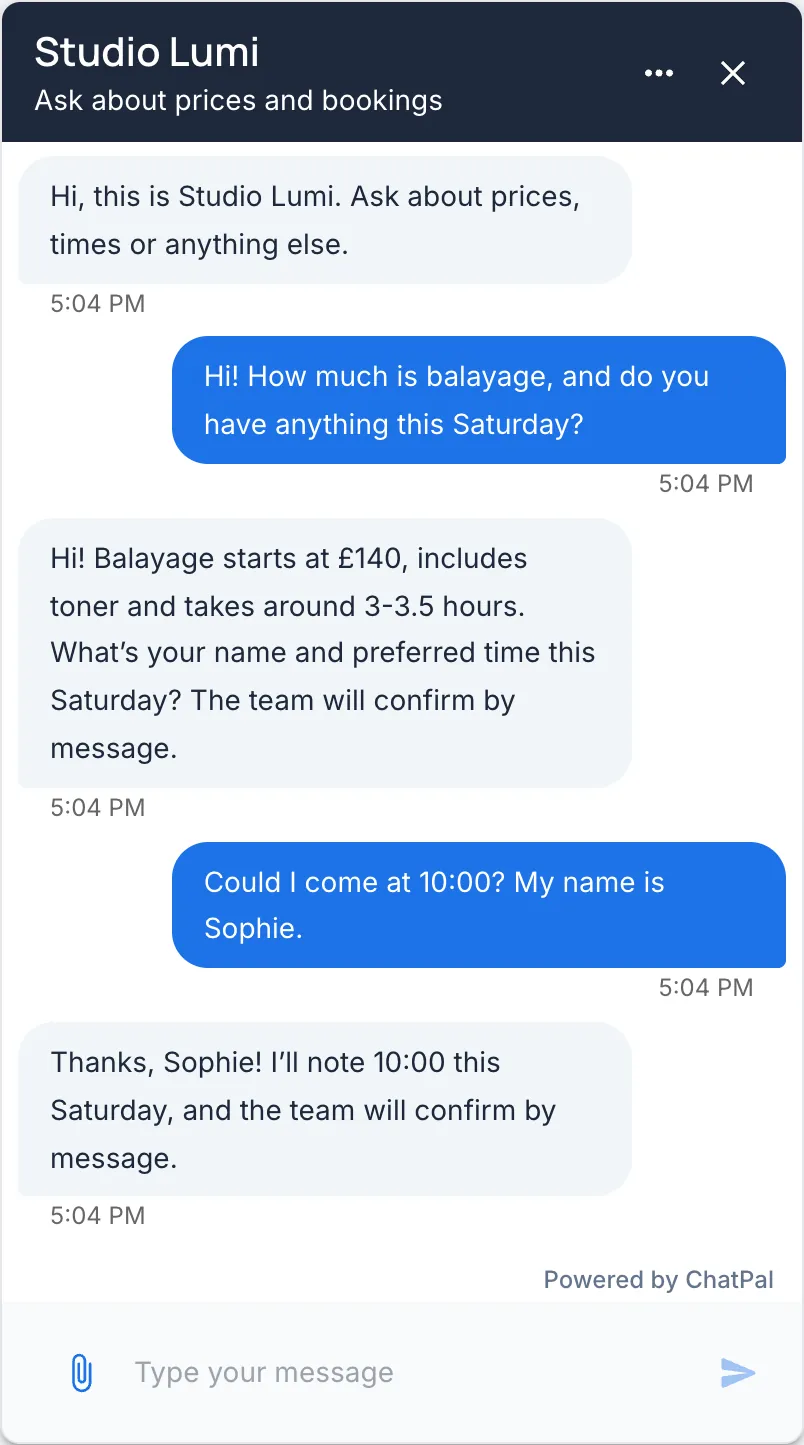
Keep in the knowledge base: the price list with durations and the cancellation policy. If you connect Google Calendar, Altegio or Calendly, delete the bracketed line: the assistant then checks free times and books in the chat itself (on Calendly's free plan it shares your booking link). Our booking chatbot examples show that conversation step by step.
Dental clinic
Role
- You are the assistant for [clinic name], a [family] dental clinic in [city].
- You answer questions about treatments, prices, insurance, opening hours and appointments.
Behavior
- Don't explain symptoms, diagnose or suggest treatment. Say a dentist needs to see it and offer a check-up.
- If someone describes severe pain, swelling or a knocked-out tooth, give our emergency number, [phone], before anything else.
- When you give a price, say the final cost is confirmed after the examination.
- For insurance, name only the plans on our insurance page. For any other plan, say the front desk will check.
- Don't ask for medical history, insurance numbers or other health details in the chat.
- [Without online booking:] For appointment requests, ask for the patient's name and preferred day, and say reception will confirm.
Keep in the knowledge base: treatment prices, accepted insurance plans and opening hours. As with the salon, delete the last line once a booking calendar is connected.
Real-estate agency
Role
- You are the assistant for [agency name], a real-estate agency in [city or area] that helps clients buy, sell and rent homes.
Behavior
- Before suggesting listings, ask whether they want to buy or rent, then their budget, then the area, one question per message.
- Suggest at most [three] listings, and only ones that match. Give the price, size and area of each, and the link when you have it.
- Never say a property is still available. Say an agent will confirm.
- Don't describe an area by who lives there, or as safe or right for a type of person or family. Share facts from the listing, such as the distance to [transit or schools], and suggest a viewing.
- Don't estimate what a home is worth. Offer a valuation with an agent.
- When someone wants a viewing or wants to sell, ask for their name and phone number so an agent can call them.
Keep your listing pages in the knowledge base. A crawled listing stays there after the home is sold until you remove it or choose Reindex on its link, which is why the template never confirms availability. The line about areas matters in the US, where the Fair Housing Act prohibits real estate companies from discriminating because of race or color, religion, sex, national origin, familial status or disability. "Great for families" judges who should live somewhere; the distance to a school is a fact. This template, like the others, is a starting point, not legal advice.
Hand-offs need a category, not just a line
A line such as "pass complaints to our team" changes what the assistant says, but it doesn't move the chat to a person. In ChatPal, that happens when the customer asks for one, or when a message matches a category set to hand off:
- In Configuration, open the Handoff & leads tab and switch on Hand off to a human when needed. It is off by default.
- Open the Automation tab, then Categories, click Add category, name it ("Complaint" or "Damaged item", say) and choose Human escalation.
The assistant then goes quiet in that chat, your team gets an alert by email or Telegram, and someone replies from Chats.
When a fixed script is still the right tool
Sometimes the wording mustn't vary, or every step is known in advance.
- Words that must be exact. An emergency number, a legal notice, a fee you never want paraphrased. Give that type of message its own category set to Fixed response, and the assistant sends your text word for word. ChatPal allows one such category per assistant, so keep it for the message that matters most.
- The first tap. If most chats start with the same three questions, add them as quick-reply buttons under the welcome message: up to 10, but keep to three or fewer, 20 characters or less each, so they show properly on every channel. The assistant answers a tap like a typed question.
- Campaigns and fixed sequences. A reply to everyone who comments a keyword under a post, a quiz, an event sign-up, a broadcast. Flow builders are made for these, and ChatPal doesn't run keyword campaigns or broadcasts. Our comparison of no-code chatbot builders covers the tools that do.
- Questionnaires someone else wrote. A loan pre-qualification or a medical intake form, with set questions in a set order, belongs in a form. The assistant can send the link if the form's page is in its knowledge base.
Most businesses end up with both: a few fixed pieces where the words must be exact, and instructions for everything else.
Check each line does its job
Open Playground and ask the question each line is there for, the way a customer would type it. If a reply ignores a line, make that line more specific rather than adding a second one. Click Save as test on each conversation that comes out right, so you can rerun it after your next change. Each Playground reply counts toward your monthly messages: 100 on the free plan, 500 on Starter at $20 a month (pricing, checked 19 October 2026).
For what to leave out of instructions, see chatbot instructions that don't hallucinate. If you haven't set up an assistant yet, how to build an AI chatbot covers the whole setup.